How to / Start here
What is a GEDCOM file
A plain text format for exchanging family trees. Learn how its records and pointers work, and what to check before another program imports it.
Beginner10 minutesChecked against the tools on 6 Sep 2026Uses File Inspector and GEDCOM Validator
what-is-a-gedcom-file.md, 7,433 characters. The same bytes answer at /how-to/what-is-a-gedcom-file.md.
A GEDCOM file is a plain text format for exchanging family trees between programs. It usually ends in .ged. Many genealogy programs support it, but they differ in the versions and structures they accept.
Use this page to read the structure and check what an export contains before importing it into another tree.
What is in one
Six illustrative lines:
0 @1@ INDI
1 NAME Max /Mustermann/
1 SEX M
1 BIRT
2 DATE 1 JAN 1980
1 FAMC @F1@
A line starts with a level, can include a record identifier, then carries a tag and an optional value.
The level is the first number. 0 starts a new record. A line at level 1 belongs to the record above it, and a line at level 2 belongs to the level 1 line above it. That is the whole nesting rule.
The tag follows the level and any record identifier. INDI is an individual, FAM a family, NAME a name, BIRT a birth, DATE a date, SOUR a source. Standard tags depend on the GEDCOM version. A tag starting with an underscore denotes an extension.
The value, when present, follows the tag. In NAME Max /Mustermann/ the slashes delimit the surname. The BIRT line has no value; its child DATE supplies a detail.
@1@ is an identifier, called an xref. @F1@ on the last line is a pointer to a family record elsewhere in the file. Family relationships use pointers between records. A pointer to an absent record can leave a relationship incomplete or cause an importer to reject the file.
A file is a header, then records, then a trailer:
0 HEAD
1 SOUR AHN
1 GEDC
2 VERS 5.5.1
1 CHAR UTF-8
0 @1@ INDI
...
0 TRLR
The header declares the producing program, GEDCOM version and, in older versions, character set. Those declarations guide a reader, but they can be missing or wrong.
What causes the losses
Three versions are in use, and they are not the same format.
5.5 dates from 1996; older exports can use ANSEL, a library character set. 5.5.1 dates from 1999 and permits UTF-8. 7.0 arrived in 2021, requires UTF-8, changes text continuation and adds a schema mechanism for extension tags. Check which version your destination accepts before converting.
Programs also add extension tags, such as _APID for citation identifiers and _UID for record identifiers. Their meanings and supported forms depend on the producer. An importer may map an extension, retain it or drop it.
After an import, compare people and family links as well as sources, notes, media links and custom events. A successful upload does not prove that the destination retained those details.

Diagram source
flowchart TD
  P["Your genealogy program"] --> E["Export as GEDCOM"]
  E --> H["Header: version, producer, charset"]
  E --> R["Records: INDI, FAM, SOUR, NOTE, OBJE"]
  E --> X["Extension tags: _APID, _UID, and the rest"]
  H --> I["Another program imports it"]
  R --> I
  X --> D{"Does the importer know this tag?"}
  D -- "yes" --> I
  D -- "no" --> L["May retain or drop it. Check the imported result"]
The steps
Numbers below are from fixtures/public/Musterstammbaum.ged.
- Open File Inspector and drop your file. It parses in your browser; the file does not leave your machine.
- Read Header. On this fixture GEDCOM version reads
5.5.1, Producer readsAHN (Ahnenblatt) 2.99g, Declared charset readsUTF-8, Decoded as readsutf-8 with BOMand Line endings readsLF. - Read Records by type. On this fixture
INDI 20,FAM 11, andHEAD,SUBMandTRLRat 1 each. These are level-0 record counts. Inline citations, notes and media can exist without separateSOUR,NOTEorOBJErecords. - Read Problems. On this fixture the title reads
Problems: 0 errors, 0 warnings, 0 info. The table covers parser and encoding findings, including informational observations. It displays the first 200 rows; the totals cover all findings.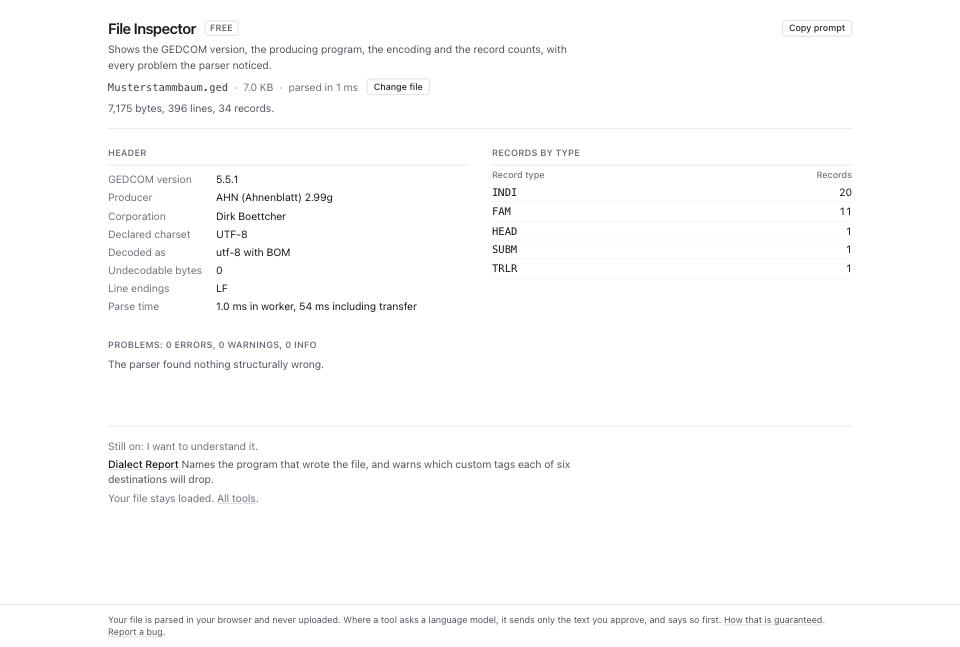
- Open GEDCOM Validator and drop the same file. The header line states how many rules ran and what was checked: records, individuals, families, pointers, dates and facts.
- Read the category table.
structuralis whether the file is written correctly.referentialis whether the pointers resolve.logicalis whether the content can be true.encodingis whether the bytes match the declared charset. - Read the three severity counts. The validator assigns
error,warningandinfoto prioritize review. An error can matter to an importer, but these labels do not predict whether a particular program will accept the file.
What to check when it worked
- Header names the expected GEDCOM version.
unknowncan mean a missing, malformed or unsupported version declaration. - The
INDIcount matches the size of the tree you exported. - Problems in File Inspector is empty, or holds only
inforows. - Review errors under
structuralandreferential, then test the output in a separate destination tree. Passing these checks does not guarantee import support. - The producer line matches the expected exporter. Treat an unexpected value as a clue to investigate, not proof of the file's history.
What to do when it did not
The version reads unknown. Check HEAD.GEDC.VERS for a missing, malformed or unsupported value. GEDCOM error messages, decoded covers header checks.
The counts are far below what you exported. Check export filters, selected branches and the sender's expected counts. Truncation or malformed record starts can also reduce the count. The parser continues through malformed input; a low count alone does not establish the cause.
You want to assess a destination. Which of your custom tags each site will delete applies dated compatibility rules to your file. Confirm the result with a test import; the report does not run the destination's importer.
Your file is 7.0 and you want another conformance check. The external js-gedcom checker offers an additional check. Review its documentation and privacy behavior before loading a private tree.
You want to open it and read it, not audit it. Read a GEDCOM without installing anything is the shorter path.