How to / It will not open, or it opened wrong
GEDCOM error messages, decoded
Use an import error as a starting point. Check the file's structure, encoding and pointers before choosing a repair, and review what recovery changes.
Beginner15 minutesChecked against the tools on 6 Sep 2026Uses File Inspector, Corrupted File Recovery and GEDCOM Validator
decode-gedcom-error-messages.md, 9,387 characters. The same bytes answer at /how-to/decode-gedcom-error-messages.md.
An upload failed and the site gave you a sentence. Invalid GEDCOM file. Unable to import GEDCOM. Error 20. The sentence names no line, no record and no byte. Search it and you get forum threads where five people guess.
An error message can narrow your checks, but different programs reuse broad phrases for different failures. You cannot infer a specific bad byte or repair from a generic message alone.
What causes it, message by message
Use the first column to choose an initial check. The codes below are findings to look for in this site's Inspector or Validator, not translations of another program's error codes.
| The message you got | Possible causes or checks | Local finding to look for |
|---|---|---|
| Invalid GEDCOM file. No header record found | Check for 0 HEAD, unexpected content before it, and the intended file format | missing-head; inspect the opening lines |
| Unable to import GEDCOM | Check structure, encoding, supported version and destination limits | No single code; start with Problems and record counts |
| Line 1: header error | Check the header declaration, byte order mark and the importer's encoding support | missing-head, encoding findings, or no local finding |
| GEDCOM file is not valid | Inspect malformed lines, header/version and the destination's requirements | malformed-line is one possibility |
| Error 20, invalid GEDCOM format | Consult that program's documentation for its code 20; inspect the file before choosing a repair | No established one-to-one mapping; level-jump matters only if found |
| Some of the data in this GEDCOM file was not uploaded correctly | Compare missing data against validator findings and destination mappings | Validator findings or Dialect Report guidance |
| The file contains no individuals | Check export filters, actual individual records and malformed record starts | INDI count in Records by type |
| Duplicate ID / record already exists | Check duplicate xrefs in this file and possible collisions in the destination tree | duplicate-xref checks this file, not the destination |
| Names contain question marks or boxes after import | Compare original text, encoding and font display; replacement characters may predate import | invalid-utf8 or charset-mismatch can help, but neither must appear |
Partial imports and wrong characters can originate in the export, transfer or destination. Compare the original before assigning a cause. Custom-tag compatibility and encoding repair cover those checks. A missing 0 TRLR merits review but does not prove that record data is missing.
Which tool reads which message

Diagram source
flowchart TD
  M["You have a refusal message"] --> I["File Inspector: drop the file"]
  I --> P{"What does Problems list?"}
  P -- "missing-head, level-jump, malformed-line, duplicate-xref, missing-trlr" --> R["Corrupted File Recovery"]
  P -- "invalid-utf8, charset-mismatch, undefined-ansel-byte" --> E["Encoding Repair"]
  P -- "nothing, and the counts look right" --> V["GEDCOM Validator and destination requirements"]
  R --> RV["Validate the recovered file"]
  E --> RV
  V --> D["Review findings and test supported output in a separate tree"]
The fix
- Open File Inspector and drop the file on the drop target. Parsing runs in your browser; nothing is uploaded.
- Read Header. It states the GEDCOM version, the producer, the declared charset, what it was decoded as and the line endings. On
broken-structure-synthetic.gedthe version reads5.5.1, the producer readsGEDTK-TEST (GED Toolkit synthetic fixture)and line endings readLF. - Read Records by type. On the same file it lists
INDI 2,FAM 1,HEAD 1. A lower count than expected calls for checking export scope, malformed records or truncation. Inspector continues through malformed input; the count does not prove it stopped early. - Read the Problems table. Its four columns are Line, Severity, Code and Message. On this file the section title reads
Problems: 1 errors, 1 warnings, 0 infoand it holds two rows: line 15,error,level-jump,Level jumps from 2 to 9; andnot recorded,warning,missing-trlr,File has no 0 TRLR record.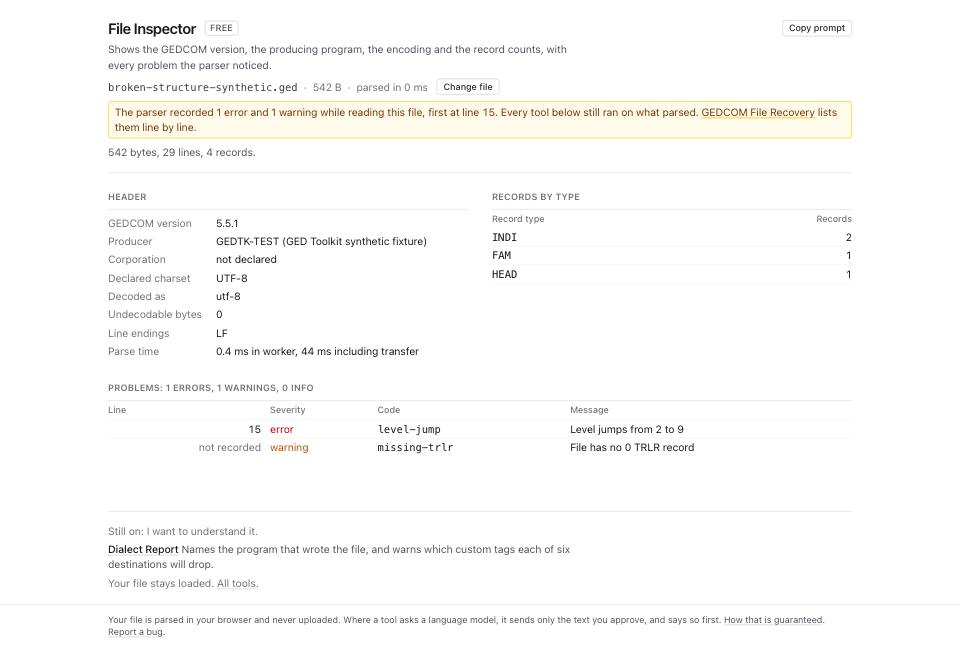
- Match local findings to the third column above. Inspector displays the first 200 problem rows while its totals cover all findings. A local problem is evidence to investigate, not proof of what caused the other program's message.
- For any code in the first branch of the diagram, open Corrupted File Recovery and drop the same file.
- Read Byte accounting first. On this file it reads
542 kept + 0 dropped = 542; input 542. Every input byte is accounted for.The line below adds that 70 of the kept bytes sit in rewritten lines and the output is 541 bytes. Kept bytes can belong to rewritten facts; this arithmetic does not prove unchanged meaning. - Read Records. The columns are Type, Input, Recovered. On this file
TRLRgoes from 0 to 1, because the trailer was synthesised, andINDIholds at 2. - Read Changes and findings: 3. Two are tagged
rewrittenand onesynthesized:Line 15: level 9 after a level 2 line; re-levelled to 3 under PLACat 60% confidence,8 line terminators rewritten to LFat 90%, and0 TRLR appendedat 95%. These results use the default, ticked Rewrite minority line endings to the dominant one setting. Review the inferred nesting; confidence is not proof of the intended structure.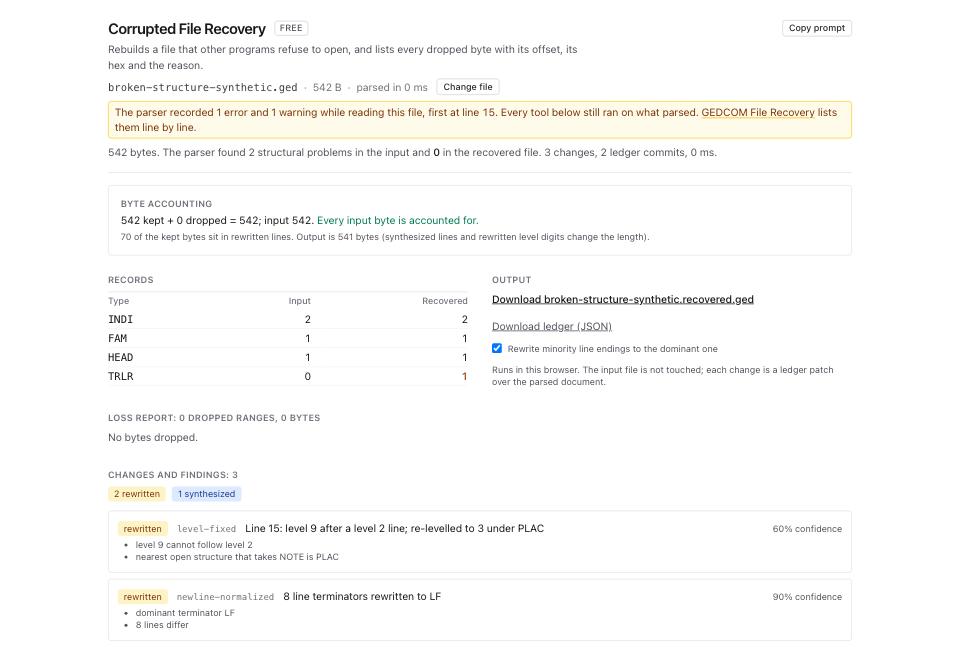
- Keep the original, then click Download broken-structure-synthetic.recovered.ged under Output if you accept the changes. Recovery has no per-change accept/reject control. It previews the first 300 findings and loss ranges; use Download ledger (JSON) to inspect the operations. Review any warning that output characters became
?before using the file. - Open GEDCOM Validator and drop the recovered file. Read the three severity counts across the top: errors, warnings, infos.
What to check when it worked
- File Inspector on the recovered file lists no row of severity
errorunder Problems. - The Records table in Corrupted File Recovery shows the same
INDIandFAMcounts in the Input and Recovered columns. Onbroken-structure-synthetic.gedthat is 2 and 1. - Byte accounting balances, and you accept the rewritten lines and any dropped ranges.
- Review GEDCOM Validator errors, warnings and infos. Its severity labels do not predict a destination's import behavior.
- Test in a separate destination tree and compare counts and sample records. A changed error message does not establish how many original faults existed; investigate the new message before making another repair.
What to do when it did not
The message stayed the same and the Inspector found nothing. Check GEDCOM Validator, including referential, and the destination's version and file restrictions. How to find every broken pointer in a GEDCOM covers unresolved references that Inspector alone does not rule out.
The message changed to one about data. Compare the new message with remaining findings and missing output fields. Dialect Report supplies dated compatibility guidance, not a live test of that destination.
Records are missing from the Recovered column. Compare the recovery's dropped ranges and rewritten structure against the original. A lower recovered count can reflect changes made during this recovery. If the input itself lacks records, ask the sender for a fresh export; recovery cannot reconstruct absent bytes.
The recovery changed something you disagree with. Keep the original. Download ledger (JSON) lists operations, but the page offers no selective undo. Correct the source or obtain another export before accepting the recovered file.