How to / It will not open, or it opened wrong
How to fix garbled characters and accents in a GEDCOM
Müller reads as Müller, or as M?ller. Compare charset detection and proposed corrections, preserve the original, and check the UTF-8 output.
Beginner15 minutesChecked against the tools on 6 Sep 2026Uses File Inspector, Encoding Repair and GEDCOM Validator
fix-garbled-characters-and-accents-in-a-gedcom.md, 9,548 characters. The same bytes answer at /how-to/fix-garbled-characters-and-accents-in-a-gedcom.md.
You open your file and the names are wrong. Müller shows as Müller. Straße shows as Straße. A Polish place name shows as boxes. Cyrillic shows as Ð\x9aÑ\x83леÑ\x88. The file opens, the tree loads, every date is fine, and every accented letter is broken.
You may be able to recover text from a wrong decoding choice or double encoding. If an earlier program replaced the original letters with ? or �, those replacements do not identify the lost letters. Boxes can also mean the font lacks a glyph. Keep the original file before trying a repair.
What causes it
A GEDCOM stores text as bytes. Older versions declare the character set in 1 CHAR; GEDCOM 7 requires UTF-8 without that declaration. Three encoding problems are worth checking.
The destination does not support the source charset. GEDCOM 5.5.1 permits ANSEL, a library character set. Some exporters also write ANSI, a vendor convention rather than a standard 5.5.1 charset name. That label alone does not distinguish Windows-1252 from other Windows code pages, including Windows-1251 for Cyrillic.
The declaration is wrong or ambiguous. The file says 1 CHAR UTF-8 but contains Windows-1252 bytes, or says ANSI without identifying a code page. A reader using the wrong decoder can corrupt the displayed names even when the source bytes remain intact.
The text was double encoded. A program read UTF-8 bytes as Windows-1252 and wrote that text as UTF-8. ü is two bytes, C3 BC. Windows-1252 interprets them as à and ¼; encoding those characters as UTF-8 produces four bytes. Changing the header alone cannot repair this Müller case.
Doubling can happen twice. „ is one double-encoded low quotation mark; a third pass gives longer runs.
Which fault you have

Diagram source
flowchart TD
  START["Accented letters look wrong"] --> A{"What shape is the damage?"}
  A -- "Müller, Straße, „, â€" --> DOUBLE["Double encoding. The header may already say UTF-8"]
  A -- "M?ller, boxes, ????" --> LOST["Compare original characters, undecodable bytes and font support"]
  A -- "Ìller, Kуleш, letters from another alphabet" --> WRONG["Investigate a possible charset mismatch"]
  LOST -- "undecodable bytes" --> WRONG
  LOST -- "literal replacement characters in the source" --> GONE["Seek an earlier export; replacements do not identify the letters"]
  LOST -- "valid letters shown as boxes" --> FONT["Check a font that supports those letters"]
  DOUBLE --> FIX["Encoding Repair: reverses the sequences and rewrites the values"]
  WRONG --> FIX
  FIX --> CHECK["Read every row: Before, After, confidence, and why"]
  CHECK --> OUT["Download the corrected UTF-8 file"]
The fix
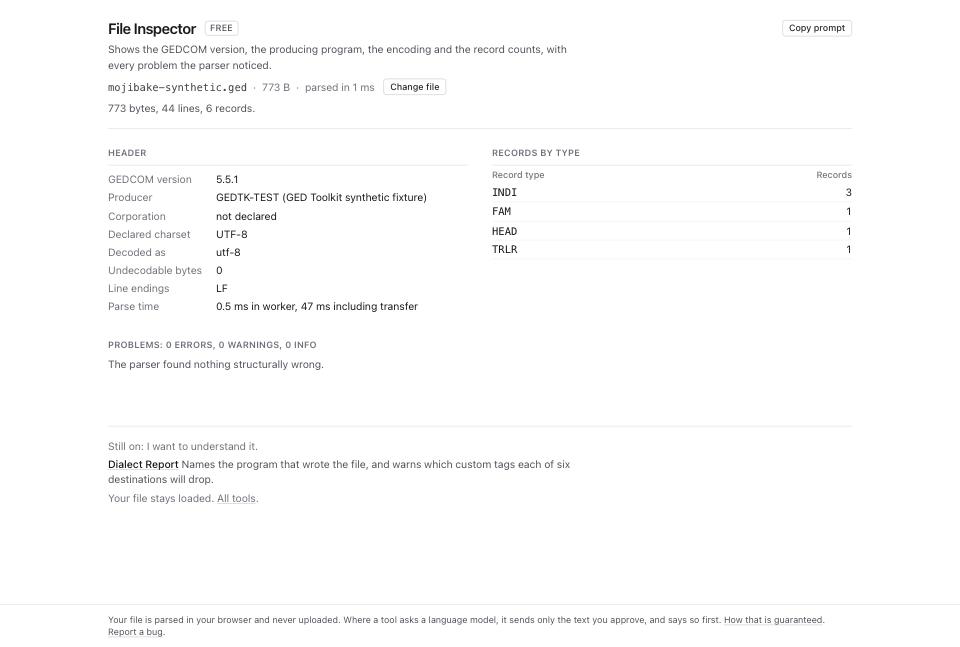
- Open File Inspector and drop the file. Read Declared charset, Decoded as and Undecodable bytes in Header. A non-zero count means the selected decoder could not interpret some bytes. It can indicate corruption or a wrong decoding choice. Different charset labels can also be aliases or reflect a byte order mark, without wrong text.
- Open Encoding Repair and drop the same file. The line under the file name states the scope, for example
59 values with non-ASCII text, 59 corrections. - Read the verdict block. HEAD.CHAR says is the declaration. Parser read it as names the decoder. Bytes are gives a heuristic charset estimate and confidence, not proof. Double encoding counts suspected affected values and sequences.
- Open How the charset was decided to read its rationale. Detection samples up to about 512 KiB of non-ASCII value bytes and compares UTF-8, ANSEL, Windows-1252, Latin-1, Mac Roman and Windows-1251. UTF-16 input has separate handling. Tied candidates can produce identical text on the sample; inspect representative names outside it too.
- Read Corrections: Apply, Record, Field, Before, After, Confidence. Each row names a record, field path and physical line. The preview shows the first 400 corrections; proposals start accepted, including undisplayed rows.
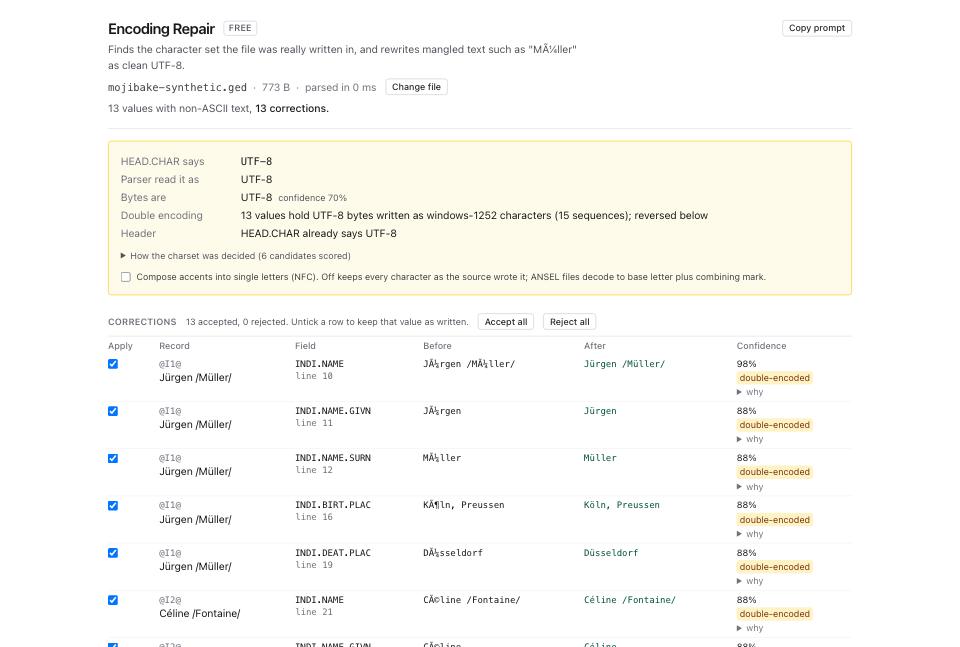
- Open why on a doubtful row. It names byte sequences and counts suspicious patterns before and after.
oddities 3 to 0reports a heuristic score; valid text can also contain unusual patterns. - Untick Apply to reject a value correction. Accept all and Reject all affect undisplayed corrections too. Rejection preserves the parser's decoded value, not necessarily the original bytes: a source-charset change can still transcode it to UTF-8.
- Compose accents into single letters (NFC) starts off. Tick it to compose sequences such as
uplus combining umlaut where Unicode permits. Leaving it off avoids that normalization, but does not prevent transcoding or other accepted corrections. Changing the setting reruns the report and resets selections, so choose it before reviewing rows. - Read Header for the planned
CHARchange. Encoding Repair does not add a missingCHARto GEDCOM 7, but it does not remove an existing one either. Validate the output's version-specific structure. - Read Corrected UTF-8 file. Up to 5,000 corrections, the page builds output on load. Above that, press Apply N changes and build file after reviewing selections. The summary separates corrected values from values transcoded with the same decoded text. A valid ANSEL file can need only transcoding; an ANSEL file with damaged text can need corrections too.
- Click the download link under that summary. It is named after your file:
Musterstammbaum.gedgivesMusterstammbaum.utf8.ged. Download ledger (JSON) beside it holds every operation as machine-readable JSON. - Open GEDCOM Validator and drop the corrected file. Filter the category select to
encoding.
What to check when it worked
- The corrections table shows the names you expect in the After column. Read ten of them, including one with punctuation.
- The output summary's correction and transcode counts fit the work you accepted. Either count can be zero.
- File Inspector on the output reports Undecodable bytes 0 and UTF-8 decoding. In older versions, check the UTF-8 declaration too. Do not infer valid bytes from the header alone; unchanged invalid UTF-8 bytes can survive the repair.
- GEDCOM Validator reports no issue in the
encodingcategory. - Open the corrected file in GEDCOM Viewer and search for a name you know carries an accent.
What to do when it did not
A row proposes a change that reads worse than the original. Untick it and compare against a source you trust. The detector uses safeguards against implausible reversals, but those safeguards cannot establish the correct spelling of a name.
The confidence on Bytes are is under 0.7. Sparse text, competing decodings or unusual content can reduce confidence. Compare names in each language against trusted records before downloading; a score alone cannot choose the correct charset.
The names are still wrong after the repair. The file may have been damaged twice by different alphabets, or the accents may have been stripped to ? before you received it. A ? carries no information about what it replaced, so ask the sender for a fresh export.
The corrected file will not import. Inspect and validate it before choosing another repair. Check the destination's supported version and encoding. How to fix a GEDCOM file that will not open covers structural recovery when findings support it.
Your destination requires ANSEL. Encoding Repair exports UTF-8 only; it has no ANSEL output selector. Use a source program that supports the required export charset and check its unencodable-character warnings. Keep your UTF-8 and original copies.
The file is GEDCOM 7 and you see a CHAR line. GEDCOM 7 requires UTF-8 without CHAR. Correct that version-specific issue in the source and validate again. Encoding Repair retains an existing CHAR, and selecting an already-matching target in Format Converter can leave the file unchanged. The conversion guide explains conversion limits.