How to / Convert GEDCOM versions
How to convert GEDCOM 5.5.1 to 7.0, and what does not survive
Compare version mappings and unrepresentable structures before converting. Review extension or drop choices, validate the output and keep the original.
Intermediate20 minutesChecked against the tools on 6 Sep 2026Uses Format Converter, GEDCOM Validator and Dialect Report
convert-gedcom-5-5-1-to-7-0-and-what-does-not-survive.md, 9,981 characters. The same bytes answer at /how-to/convert-gedcom-5-5-1-to-7-0-and-what-does-not-survive.md.
A site asks for GEDCOM 7, while your program exports 5.5.1. Or someone sent you a 7.0 file that your desktop program does not support. Check the destination's accepted versions before converting.
Conversion can change or lose structures in either direction. Review the report for your file and keep the original; converting back does not restore its original bytes.
What causes it
GEDCOM 7 is not 5.5.1 with a new version number. It changed six things that matter to a converter.
Line continuation. 5.5.1 uses CONC to split long values within its line-length limit. GEDCOM 7 removes CONC; the converter joins those fragments when converting up and wraps long lines when converting down.
Character set. 5.5.1 declares one in HEAD.CHAR and permits ANSEL. 7.0 is UTF-8 by definition and removed the tag.
Dates. 5.5.1 marks a non-Gregorian calendar with an escape such as @#DJULIAN@ and can write a dual year as 1648/9. GEDCOM 7 uses a JULIAN keyword and has no dual-year form. This converter writes 30 JAN 1648/9 as 30 JAN 1649 plus a PHRASE holding the original. Changing a calendar marker's notation does not itself convert a Julian date to Gregorian.
Notes. A 5.5.1 NOTE record becomes a 7.0 SNOTE, and every pointer at it changes with it.
Extension tags. Both versions support underscore-prefixed extensions. GEDCOM 7 provides HEAD.SCHMA declarations with URIs. The converter creates declarations for extensions it retains, but a generated URI does not establish that another program understands the tag.
Structures that need a mapping or fallback. GEDCOM 7 forms such as NO, CREA, SDATE, MIME, TRAN, PHRASE, EXID, CROP, FACT, SEX X and @VOID@ need version-specific handling. Some have mappings, such as FACT; others need extensions or lose representation. Read the disposition for the actual occurrence rather than assuming the tag has no possible 5.5.1 form.
What each direction costs

Diagram source
flowchart TD
  A["A 5.5.1 file"] -->|"convert up"| U["Apply relevant supported mappings"]
  U --> U1["CONC joined into the line it continues"]
  U --> U2["HEAD.CHAR removed, file written as UTF-8"]
  U --> U3["NOTE records become SNOTE, pointers follow"]
  U --> U4["Extension tags declared in HEAD.SCHMA"]
  U --> U5["Review date rewrites and retained original phrases"]
  U --> UL["Review unrepresentable structures, including HEAD.FILE"]
  B["A 7.0 file"] -->|"convert down"| D["Apply supported reverse mappings"]
  D --> D1["Lines over 255 characters split with CONC"]
  D --> D2["HEAD.CHAR UTF-8 written back"]
  D --> DQ{"A structure 5.5.1 cannot express"}
  DQ -->|"Keep as _TAG"| DK["Use an extension where supported; check the loss report"]
  DQ -->|"Drop"| DD["Removed, listed in the loss report"]
  UL --> R["Inspect the loss report, then validate and test the output"]
  DK --> R
  DD --> R
The fix
- Open Format Converter and drop the file. The line under the file name states both versions and the work, for example
The file declares GEDCOM 5.5.1. Writing GEDCOM 7.0. 22 of 34 records rewritten, followed by the time it took. - Under Write, click GEDCOM 7.0 or GEDCOM 5.5.1. The page defaults to the version the file is not.
- Read the stat strip: Records rewritten, Lines rewritten, Lines added, Lines removed, Not in 7.0 (or Not in 5.5.1), Patch ops.
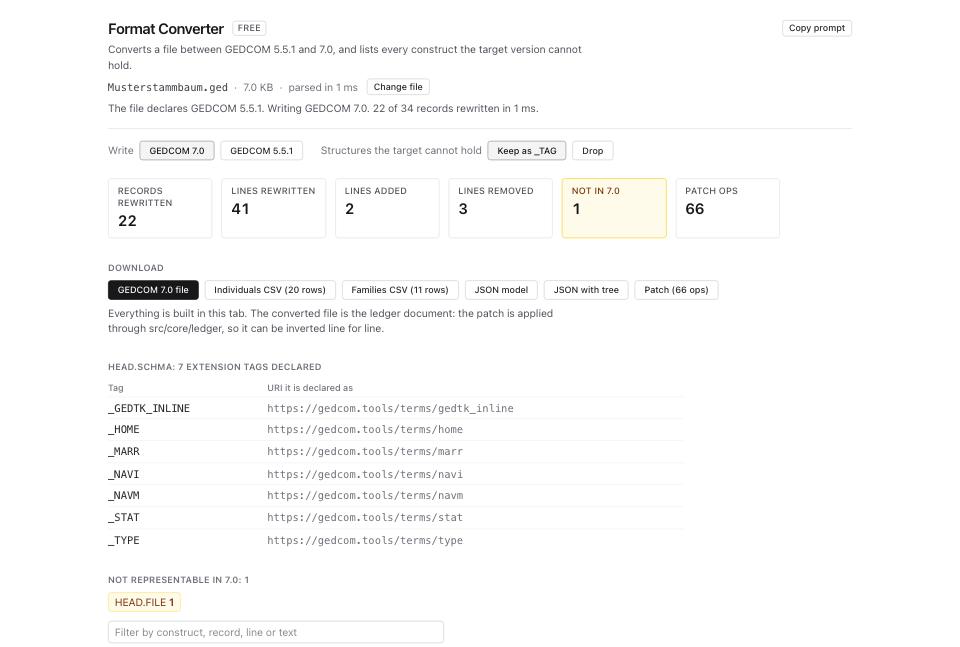
- Read Not representable in
<target>: N: Construct, Record, Line, Source, What happens. Convertingfixtures/public/Musterstammbaum.gedup gives one loss entry,HEAD.FILEat line 9. Its current counts are 22 records rewritten, 41 lines rewritten, 2 added and 3 removed. Other files can have further losses, including submission or unsupported nested structures; one loss is specific to this fixture. - In either direction, review Structures the target cannot hold. Keep as _TAG retains unsupported structures as extensions where the mapping allows it; Drop removes them. Some mappings still drop a structure, so inspect What happens rather than assuming Keep preserves everything. The loss table displays the first 400 matches; use its filter to narrow the list.
- Read What the conversion did: Rule, Count, 5.5.1 form, 7.0 form. The catalogue contains 37 mapping rows, including entries that are not automated. Only relevant supported mappings apply to your file, and reverse conversion is not a symmetric replay of all rows.
- Read Line by line: N for change details. It starts with 200 rows and offers Show the other ... for more reported changes. The worker report keeps up to 2,000 change entries by default and counts omissions; the preview is not a complete textual diff of a large conversion. The downloadable patch contains the operations.
- Going up, read HEAD.SCHMA: N extension tags declared.
Musterstammbaum.gedgets seven declarations, including_HOME,_MARRand_STAT. Check the generated URIs and the destination's support; declarations alone do not make extensions portable. - Download GEDCOM 7.0 file or GEDCOM 5.5.1 file. Patch (N ops) contains invertible tree operations, but excludes document encoding metadata. An inverse patch alone cannot restore the original charset or byte order mark. The page also offers Individuals CSV, Families CSV, JSON model and JSON with tree, which export the loaded input's data.
- Open GEDCOM Validator and drop the converted file. Compare the
errorscount with the original.
What to check when it worked
- Compare
INDIandFAMcounts and investigate any change. Record counts alone cannot show lost nested details. - Review the dispositions in Not representable, including any hidden matches. A short report does not establish lossless conversion.
- Compare the actual GEDCOM Validator findings before and after. Equal error counts can hide different errors; version changes can add or remove applicable rules.
- Validate continuation, line-length, charset and extension rules for the target version. A converter report is not a conformance guarantee.
- Keep the original. Even
Musterstammbaum.geddoes not round-trip through both versions to identical bytes. Inverse tree operations and conversion back do not restore all source formatting or encoding metadata. - Open the output in GEDCOM Viewer and check a person with a long note, an accented name, and a citation.
What to do when it did not
The loss report is long going down. The public maximal70.ged sample produces 178 loss entries with Keep as _TAG and 147 with Drop. Dropping a parent can remove descendant handling from the report, so a lower entry count does not mean less data loss. Review source structures and dispositions.
The destination still refuses the converted file. Check its supported versions and limits, then the remaining validator findings. Dialect Report supplies dated compatibility guidance, not a live importer test. Follow the destination preparation guide and test in a separate tree.
Accents broke during the conversion. The charset change is separate from the structure change, and a file whose header lies about its charset converts the lie. Run Encoding Repair first and convert the corrected file. See how to fix garbled characters and accents.
The page says the patch was not replayed. The ledger guard permits replay when patch ops × max(1, records) is at most 40,000,000. Above that, or if the ledger refuses the patch, the download uses the converter's result and the patch remains available. This guard is a work estimate, not a file-size or timing guarantee. Read Last export and validate the downloaded result.
A custom tag disappeared. Compare its original path with the mapping, loss report and schema declarations. The converter can rename a non-standard tag with an underscore, while dropping an unsupported parent can also remove nested data. A name search alone does not establish preservation.
The file already declares the target version. Conversion can be a no-op. Selecting GEDCOM 7 for a file that already declares 7 does not guarantee cleanup of an illegal CHAR or other malformed structures. Validate and correct the source issue.
Your dates changed. Going up, a dual year such as 30 JAN 1648/9 is written as 30 JAN 1649 with PHRASE 30 JAN 1648/9 under it, because 7.0 has no dual-year form. The original text is still in the file. If your dates need work beyond the version change, Date Normaliser handles localised months, Julian conversion and ambiguous readings, and flags what the digits do not settle.