How to / Repair links and dates
Why your dates changed when you uploaded
Check numeric date order, calendar conversion and chronology findings. Review ambiguous readings against records before changing dates in your export.
Intermediate20 minutesChecked against the tools on 6 Sep 2026Uses Date Normaliser, Impossible Fact Fixer and GEDCOM Validator
why-your-dates-changed-when-you-uploaded.md, 10,616 characters. The same bytes answer at /how-to/why-your-dates-changed-when-you-uploaded.md.
You typed 16 March 1940. The site shows a different day, or a different month, or a year you never entered. Nothing in the tree is missing. The dates moved.
Start by separating a changed interpretation from a possible error in the recorded facts. Calendar conversion can change the written day while preserving the same historical day.
02.09.1900 does not identify which of the first two numbers is the day. Day-first gives 2 September; month-first gives 9 February. Both are possible interpretations, but only evidence from the source can establish the intended date.
A child born before the father or a death before birth can indicate wrong dates, wrong family links or an unresolved parsing or calendar assumption. Check the interpretation before editing the digits.
What causes the reading to flip
For a complete Gregorian date, GEDCOM uses a day, month abbreviation and year, such as 2 SEP 1900. It also supports partial dates, qualifiers, ranges and calendar-specific forms. A recognized month abbreviation avoids the day/month ambiguity of an all-numeric date.
An exporter that writes 02.09.1900, 03/04/2011 or 12/05/03 leaves ambiguity in the date string. Programs can choose different readings, reject it or retain it as text. Export country is a clue, not proof of date order, especially after merging trees.
Three more forms behave the same way:
12/05/03has a two-digit year. 1903, 1803 and 2003 all fit.31 FEB 1946names a day that does not exist. The month is unambiguous and the date is still not real.FROM 1915 TO 1912ends before it starts.
A permissive parser can interpret a malformed date in an unintended way and produce a misleading age. Other readers may reject or skip it. Review the actual parsed dates behind a chronology finding.

Diagram source
flowchart TD
  S["A date came back different"] --> N["Date Normaliser: read the file"]
  N --> Q{"Which column does the row sit in?"}
  Q -- "to change" --> A["Review the proposed form and calendar assumptions"]
  Q -- "to decide, flagged day or month" --> B["Set Numeric dates read as, then choose per row"]
  Q -- "to decide, flagged no century or day does not exist" --> C["A person has to supply the answer; the file does not hold it"]
  A --> I["Impossible Fact Fixer: run it after the dates are readable"]
  B --> I
  C --> I
  I --> V{"Does a finding survive readable dates?"}
  V -- "yes" --> R["Check source dates, family links and remaining assumptions"]
  V -- "no" --> D["It was the unreadable date all along"]
The run
Numbers below are from fixtures/public/ambiguous-dates-synthetic.ged, a 7-person file holding 15 dates.
- Open Date Normaliser and drop the file. The header line reads
15 dates read. 6 are already in the standard form. - Read the summary list under the settings panel. On this file it reads
15 dates read; 6 already canonical,4 can be normalised,5 need a decision and are not changed until you accept them,month names in English, French. - Read the section title above the table:
4 to change, 5 to decide. - Set Numeric dates read as using known dates from the source, not country alone. The default is
day / month / year. Ambiguous rows still require explicit acceptance; changing the setting does not accept them. The URL stores numeric order, target version and country, not the file, other checkboxes or row selections. Review mixed date conventions per row. - Find the row whose In the file column reads
02.09.1900. With day / month / year the Proposed column reads2 SEP 1900. Switch the setting to month / day / year and the same row reads9 FEB 1900. Confidence stays 0.50 either way, and the Why column lists both readings:2 SEP 1900 if 02 is the dayand9 FEB 1900 if 02 is the month.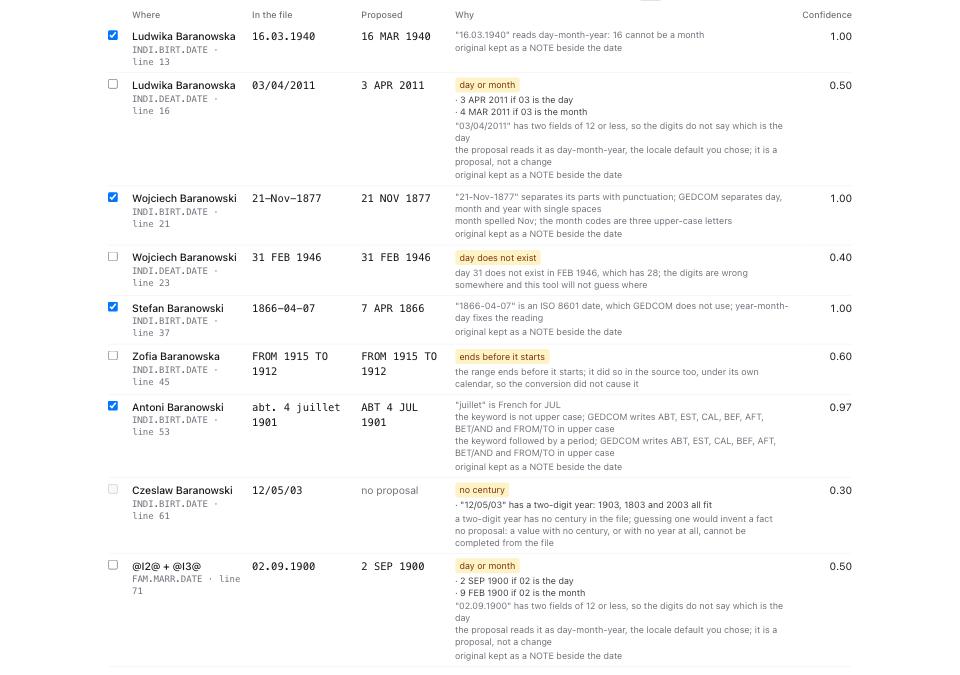
- Review the four automatic proposals. Three have confidence 1.00:
16.03.1940to16 MAR 1940,21-Nov-1877to21 NOV 1877, and1866-04-07to7 APR 1866.abt. 4 juillet 1901toABT 4 JUL 1901has confidence 0.97. These proposals preserve the interpreted dates under the example's default settings. - Check calendar settings before accepting rows. Old Style dates are from starts unset, so Julian dates do not shift. Selecting a country enables pre-cutover conversion, with the option to treat unmarked dates as Old Style ticked by default. Use the record's jurisdiction and calendar evidence, not the person's birthplace alone. Hebrew and French Republican conversion start ticked. Leave Keep the original text in the file ticked; preservation uses NOTE, PHRASE or
_ORIGaccording to scope and version. - Untick automatic proposals you reject and tick flagged proposals only after resolving them. Setting changes reset selections. The table previews 400 filtered rows; download the audit CSV for the full list. Automatic proposals outside that preview can still enter the output. Up to 3,000 selected changes, the page builds output without an extra click; larger selections require the build button. Under the example defaults, Write the file reports
4 dates rewritten, 4 originals kept in the file, 1 KBand offers ambiguous-dates-synthetic.dates.ged, ledger JSON and patch JSON. Review any warning that output characters became?. - Download the normalised file and load it into Impossible Fact Fixer to check the result. For comparison, loading the original fixture produces
7 people, 1 families, 15 dated events checked, withimpossible 3andimprobable 0. The examples below describe that original input. - Click impossible to filter. One row reads
Czeslaw Baranowski (@I7@): at least 1957 years 27 days from BIRT 12/05/03 to DEAT 1961. The parser interpreted the unresolved two-digit year as year 3. Supply the full year from a trusted record before evaluating that age. - Read the other two rows. Both are
child-before-parent-birthon@I4@: 11 years 228 days before the father and 15 years 331 days before the mother under the current interpretation. Investigate dates and links against source records. Rules that fired nameschild-before-parent-birthandage-over-120; it does not establish which source fact is wrong.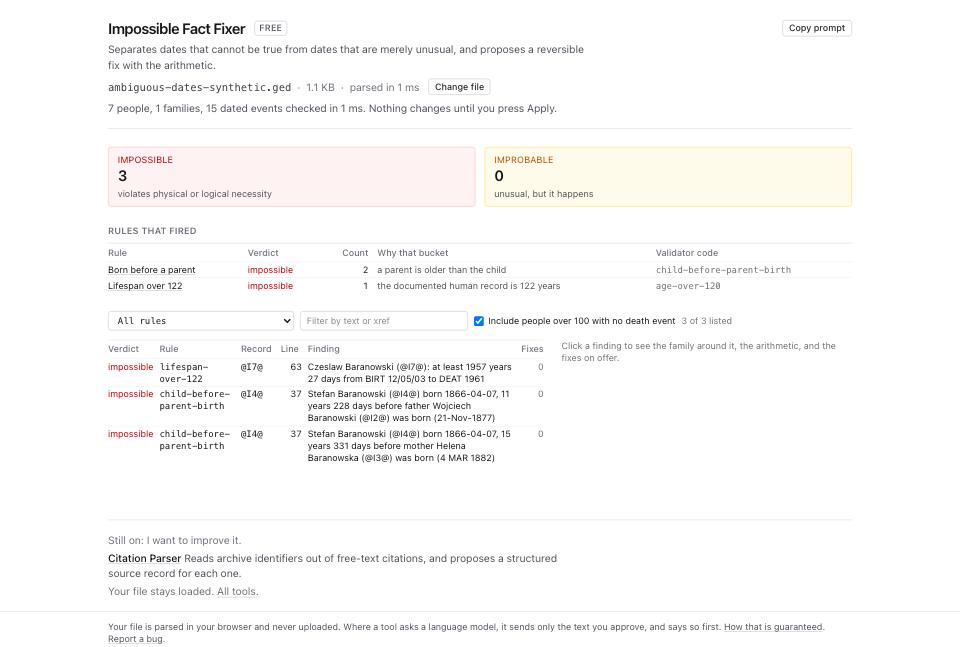
- Click a finding to read Fixes on offer and its rationale. This fixture offers no date edits; one
@I4@finding reports eight tested candidates. That only rules out the tested proposals under the current assumptions, even if the panel suggests a wrong link. The tool lists at most 2,000 findings and tests proposals for the first 300, so no offered fix can also reflect a cap. Onfixtures/public/impossible-facts-synthetic.ged, one proposal changesBIRT 1897to1879at 85%; review its evidence before applying it. - If your sources support keeping the dates, type the reason under Or keep the dates and press Reviewed, keep the dates. Download the updated GEDCOM to carry that determination with the record. Other programs may retain, ignore or drop it; it does not guarantee they will suppress the same finding.
What to check when it worked
- Date Normaliser reports 0 in the
to decidehalf of the section title, or every remaining row is one you looked at and left alone. - You checked accepted readings against source evidence, including any 0.50 ambiguous row. Confidence measures the proposal, not historical truth.
- Write the file reports as many originals kept as dates rewritten. On this fixture that is 4 and 4, each kept as a NOTE beside the date.
- Recheck the downloaded output in Impossible Fact Fixer. Remaining findings can still involve unresolved syntax, calendar assumptions, missing facts or family links. The count need not fall if you left the relevant dates unchanged.
- GEDCOM Validator on the normalised file reports no
date-unparsedand nodate-nonstandardcodes.
What to do when it did not
A row still reads no proposal. Read its flag. For 12/05/03, the missing century needs source evidence; the tool does not supply it. Correct the date in your genealogy program or source GEDCOM and rerun the check. Other unsupported forms can also lack a proposal.
The site changed the dates again after upload. Compare the downloaded GEDCOM with the destination's stored or exported values. A display format alone may differ without changing the date. Check destination settings and dated Dialect Report guidance before assigning a cause.
An impossible finding has no fix on offer and the dates look right. Check Family around this finding, source calendars and missing generations. Confirm whether the proposal cap applies. No offered edit does not prove that a relationship is wrong.
You are moving to GEDCOM 7.0 and the dates changed shape. Write dates for changes date syntax and original-text preservation; it does not upgrade the header or convert the whole document. Use Format Converter for a version change, and read the conversion guide. Review dual-year and calendar notation changes in its report.