How to / Share or move your tree
Which custom tags your destination may lose
Compare dated compatibility warnings for six destinations. Count the custom tags at risk, check the evidence, and test what your import route preserves.
Intermediate20 minutesChecked against the tools on 6 Sep 2026Uses Dialect Report and File Inspector
what-each-site-deletes-from-your-gedcom.md, 10,591 characters. The same bytes answer at /how-to/what-each-site-deletes-from-your-gedcom.md.
Before moving a tree, check whether your destination retains the people, source links, media metadata and relationship qualifiers you need. Import success and matching person counts do not prove that research details survived.
The local knowledge base cites FamilySearch's GEDCOM upload help for limits on copying sources, notes and media into Family Tree. Other rules draw on user reports, particular program versions or assumptions where evidence is sparse. Read the linked source and confirm it covers your import route.
We checked the local implementation and synthetic-file counts on 6 September 2026. The destination knowledge base remains version 2026-09-02. We did not run fresh destination imports for this article, so the table below describes profile warnings, not confirmed current platform behavior.
What causes it
A GEDCOM extension can use an underscore tag for producer-specific data. Another importer may preserve the structure, map it to a supported field, retain text only or discard it. A text fallback can preserve evidence while losing the original field semantics. The inventory also includes unknown or misplaced standard tags, so its total is not an underscore-only count.
Two identifier tags deserve attention, alongside the other research data in your export.
_APID can sit under an Ancestry source citation. A value such as 1,60525::120334455 identifies a collection and record. The profile predicts Ancestry relinking, but you should test the route and retain the citation's human-readable title, record details and URL where available. Do not assume another program discards or restores the link without checking.
_UID is a producer-specific record identifier. Programs differ in accepted spelling and value format, and GEDCOM 7 defines a standard UID. The Ancestry profile warns about _UID becoming UID and shortening in particular tested routes. Compare exact identifier values if your workflow uses them to match records.
Other extension tags can hold relationship qualifiers, research tasks, privacy flags, media crops or determination data. Decide their value from the content. Losing a qualifier or an undo patch can matter even when names and dates remain intact.

Diagram source
flowchart TD
  E["Your export and untouched backup"] --> T["Count standard, extension, unknown and misplaced tags"]
  T --> A["Read the destination rule, date, confidence and source"]
  A --> U{"Does the source cover your exact import route?"}
  U -- "yes" --> H["Treat it as a test expectation"]
  U -- "no or uncertain" --> X["Treat preservation as unverified"]
  H --> TEST["Test a small synthetic or deceased-only file"]
  X --> TEST
  TEST --> CHECK["Compare values, citations and relationships in the import and export"]
What the six destination profiles warn about
Numbers below come from a local run of Dialect Report on fixtures/public/ancestry-export-synthetic.ged: 3 people, 11 distinct inventory tags across 16 lines, 3 NOTE, 7 SOUR and 2 OBJE lines. We reproduced these counts on 6 September 2026. They count input lines, including pointers and header lines, not distinct attachments or successful transfers. A .ged file references media files; it does not contain those image bytes.
| Profile | Predicted custom-tag handling | Predicted notes, sources, media handling | Local rule IDs |
|---|---|---|---|
| FamilySearch Family Tree | 11 tags, 16 lines flagged as not reaching Family Tree | 3 NOTE, 7 SOUR, 2 OBJE lines flagged for the upload-to-Family-Tree copying route | familysearch.custom-lost, familysearch.notes-sources-media |
| Ancestry.com | 9 extension tags, 9 lines assumed lost; 4 _APID citations predicted to relink | 2 OBJE lines flag references whose local media files do not upload with the GEDCOM | ancestry.custom-unverified, ancestry.apid-relinks, ancestry.media-excluded |
| MyHeritage / Family Tree Builder | 11 tags, 16 lines flagged using an older desktop Convert to Notes/discard report | 1 EVEN/TYPE event flagged as a reported desktop round-trip success | myheritage.unknown-tags, myheritage.custom-events |
| Gramps 6.0 | 8 nested lines predicted to become note text; 2 header lines (_ENV, _TREE) lost | 3 NOTE lines flagged for rewrapping, based on the profile's Gramps 6.0.8 run | gramps.nested-custom, gramps.head-custom, gramps.notes-rewrap |
| WikiTree | 11 tags, 16 lines flagged as unmapped | Profile describes person-by-person GEDCOMpare review | wikitree.custom-tags, wikitree.gedcompare |
| GEDmatch | 11 tags, 16 lines flagged as at risk | 3 NOTE, 7 SOUR and 2 OBJE lines assumed unsupported with low confidence | gedmatch.custom-dropped, gedmatch.public |
The Ancestry profile contains an _APID relinking rule. The other cards do not prove that all other programs discard that tag, nor that any loss happens without a message. Inspect the imported citations and the export itself.
Read the whole card. familysearch.no-export concerns direct Family Tree download, not all retrieval through partner software or the separate uploaded Genealogies tree. gedmatch.public flags a disclosure risk that you should check against current GEDmatch terms before uploading.
The community-maintained Family Historian GEDCOM Extension List offers tag-specific context. Check its dates and product versions; it is not an official compatibility guarantee for another importer.
The run
- Preserve the original, then open File Inspector and drop the file. Read Header for its declared producer. The declaration alone does not establish which tags occur or whether another program rewrote the file.
- Open Dialect Report and drop the same file. The header line states the knowledge base version,
2026-09-02at the time of writing. - Read Producer. On the fixture it reads
Ancestry.com Member Trees (98%), with the rationale listingHEAD.SOUR Ancestry.com Family Trees (Ancestry.com Member Trees) matches "ancestry"andsignature tags present: _APID, _TREE, _ENV. - Read File facts on the right. Custom tags reads
11 distinct, 16 lineson the fixture. - Read Custom tag inventory. One row per tag, with Kind, Count, First at, Carried by, Under and Sample values.
_APIDreadsextension, count 4, carried byINDI 3, FAM 1, underINDI.SOUR, FAM.SOUR.UIDreadsnot in spec, count 3, carried byINDI 3, underINDI.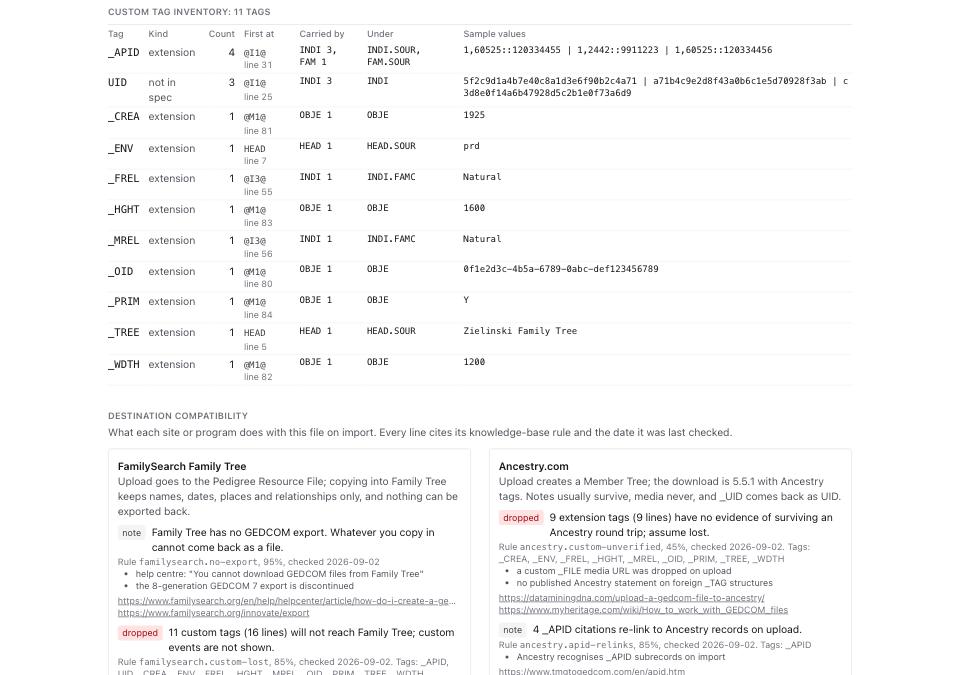
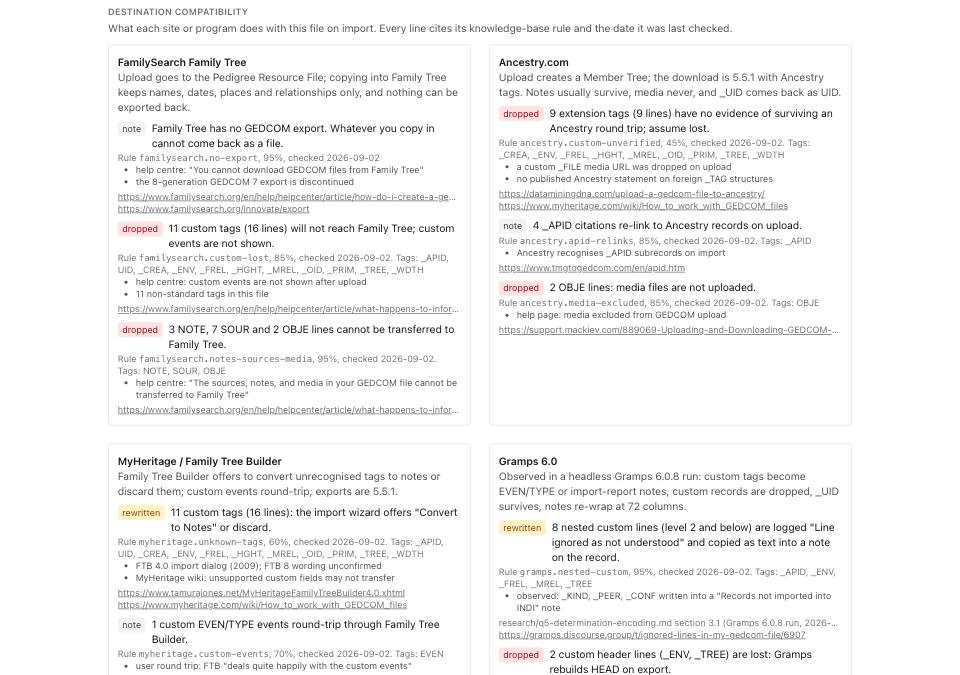
- Scroll to Destination compatibility. Six cards, one per destination. Each warning carries a badge reading
dropped,rewritten,limitornote, a rule id, a confidence and a checked date. - Read the card for the site you are moving to. Copy the rule id if you want to cite it later; every rule links its own sources.
- Test before the main upload. Use synthetic or deceased-only data containing the tag structures you need. Compare the imported content and an exported copy if available. Keep your original and media files regardless of the result; a destination cannot reconstruct a value it discarded.
What to check when it worked
- Producer agrees with the source you expect, and you have read its evidence. A 90% or 98% score reflects header/signature rules, not verified provenance. A lower score can mean an unfamiliar or missing header, not necessarily an intervening program.
- Custom tag inventory row count equals the Custom tags figure in File facts. On the fixture both read 11.
- Every warning on the destination card carries a rule id and a checked date. A line with no date is not a claim this site makes.
- The input counts agree with File facts. On the fixture,
gedmatch.custom-droppeduses 11 tags and 16 lines plus 3 NOTE, 7 SOUR and 2 OBJE lines. This checks local report arithmetic, not destination losses. - Your test import retains the values, citations and relationship qualifiers you need, or you have documented and accepted the differences.
What to do when it did not
Producer reads unknown. The file has no HEAD.SOUR this knowledge base recognises and no signature tags. The destination cards still apply, because they key off tags rather than producers, but the producer quirks section will be empty.
A tag you care about is not in the inventory. The inventory lists tags outside the specification. A standard tag such as SOUR or OBJE is counted in File facts instead, and its fate is on the destination cards under notes, sources and media.
The destination has no card. Read the inventory, check that program's current documentation and test a small file. Treat preservation as unverified and keep the backup; absence of a profile proves neither loss nor support.
You want missing tags back after the move. Compare the destination export with your original. Recover lost content from your backup after checking record identity. Direct web export, partner-software retrieval and uploaded-tree download are different routes; none guarantees restoration of discarded fields.