How to / Share or move your tree
How to remove living people before sharing your family tree
Decide who is living, redact them, and check the exported file for the addresses, phone numbers and names that hide in free text. Every verdict comes with its rule.
Intermediate20 minutesChecked against the tools on 6 Sep 2026Uses File Inspector, Living Person Privatiser and GEDCOM Validator
remove-living-people-before-sharing-your-family-tree.md, 9,720 characters. The same bytes answer at /how-to/remove-living-people-before-sharing-your-family-tree.md.
You are about to upload a GEDCOM to a public tree, send it to a DNA matching site, or email it to a cousin you have never met. Your file has your mother's date of birth in it, your own address in a PLAC field, and a note with a phone number. You want to remove those details before sharing. The privatiser retains redacted person records and family links; it does not delete living people from the tree or guarantee anonymity.
Keep an untouched backup. Check your desktop program's export settings too: programs differ in how they classify living people and handle people with missing dates.
What causes it
Two problems, and the second is the one that catches people.
GEDCOM has no single interoperable living-status flag. Producers use custom flags and privacy restrictions. This tool checks those first, then death evidence, birth years and relatives' dates. Missing or wrong evidence can still produce a wrong classification. Review the no evidence group and anyone you know is alive.
Identity leaks out of the fields you expect. A name is not only in NAME. It is in the source title someone typed by hand, in a note about a conversation, in a media file path that carries a home directory, and in the PLAC of a residence event that is somebody's street address. A field-level redactor never looks there.
How each person is classified

Diagram source
flowchart TD
  P["One INDI record"] --> S1{"Step 1: a privacy flag on the record?"}
  S1 -- "_PRIV, _LIVING, RESN confidential, placeholder name" --> L1["living, confidence 0.98"]
  S1 -- "no flag" --> S2{"Step 2: a death event?"}
  S2 -- "DEAT, BURI, CREM or PROB, unless marked negative" --> D1["dead, 0.88 to 0.99 by what the event carries"]
  S2 -- "none" --> S3{"Step 3: an own birth year, from BIRT, CHR or BAPM?"}
  S3 -- "older than the cutoff" --> D2["dead, 0.85 to 0.97"]
  S3 -- "at or after the cutoff" --> L2["living, 0.85 to 0.97"]
  S3 -- "no birth year" --> S4{"Step 4: do relatives bound the birth year?"}
  S4 -- "latest possible birth is before the cutoff" --> D3["dead, 0.5 to 0.95, decaying per relative hop"]
  S4 -- "earliest possible birth is at or after the cutoff" --> L3["living, age alone cannot make them dead"]
  S4 -- "no bound tightens" --> S5["Step 5: nothing to go on, 0.4"]
  S5 --> B{"Batch setting: people with nothing to go on"}
  B -- "treated as living, the default" --> L4["living, redacted"]
  B -- "treated as dead" --> D4["dead, outside personal redaction"]
The classifier uses the first applicable step. It does not override an own-birth-year verdict with a relative's date. It accepts DEAT Y without a date as death evidence; WILL alone does not establish death. These confidence values describe rules, not verified probabilities that a person is alive or dead.
The fix
- Open File Inspector and drop the file. Note the
INDIcount in Records by type. That is the number every later count has to reconcile with. - Open Living Person Privatiser and drop the same file. Read the living/dead counts and cutoff year. Free-text repairs can also change deceased people's records, shared notes, sources and header details.
- Read How each verdict was reached. It is a two-column table: People, Rule that decided. The
no evidencerow counts people whose status depends on your batch setting.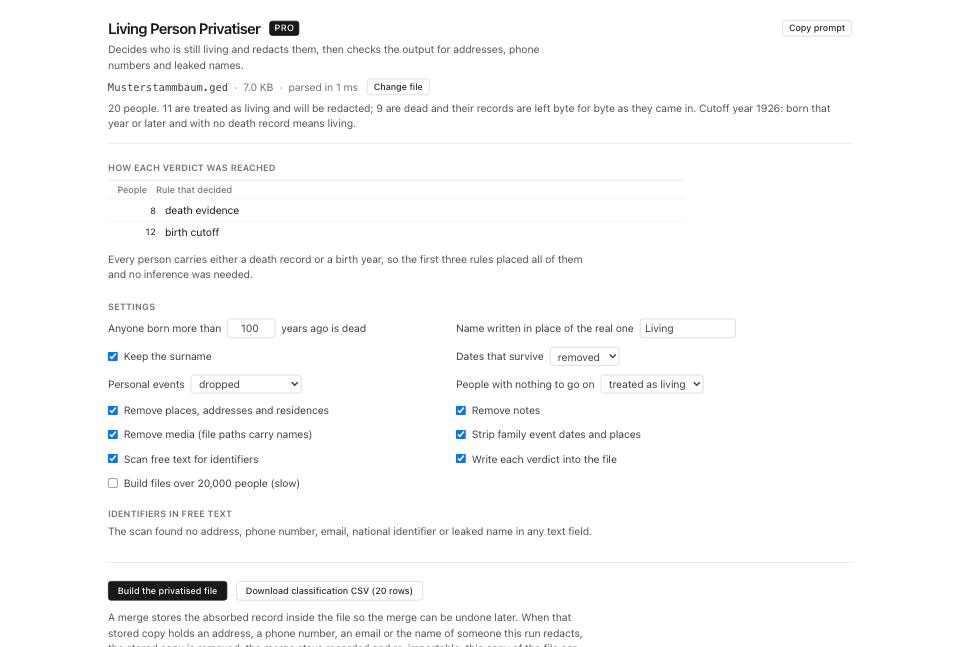
- In Settings, set the number in the box reading Anyone born more than N years ago is dead. The default is 100. Raising the age moves the cutoff to an earlier year and treats more people as potentially living. Lowering it treats more as dead. Other evidence can take precedence.
- Set People with nothing to go on to
treated as livingunless you have checked those people yourself. That is the safe direction, and it is the default. - Set Name written in place of the real one. The default is
Living. Keep the surname starts checked. Untick it unless you intend to share surnames and have assessed the identification risk from names and family links. - Set Dates that survive to
removedand Personal events todroppedfor less disclosure. To retain event years, chooseyear onlywith personal eventskept and stripped; dropping the event also drops its date. Review whether the retained year and event type identify someone. - Leave Remove places, addresses and residences, Remove notes and Remove media (file paths carry names) ticked. Each of the three is a documented leak route.
- Leave Strip family event dates and places and Scan free text for identifiers ticked. The scanner follows
CONCandCONTtext joins and looks for supported address, phone, email, identifier, path and name patterns, including some inflected names. It can miss unfamiliar formats, aliases and indirect identification. - Read Identifiers in free text. A dot after a record marks a hit outside the redacted person set. Some repairs replace matching text with
[removed]; others remove or blank a field. Check the build's Free-text repairs list. - Click Build the privatised file.
- Read the Verify line. The build serializes the output, parses those bytes and scans them again.
Verify: pass.means the configured scan found no residuals and the classifier covered all person records. It does not prove anonymity. If verification fails, do not share the download even if the download button remains available. - Click Download privatised .ged after resolving reported failures. Review the downloaded copy before sharing.
- Click Download classification CSV (N rows) for your private audit. It includes original names, verdicts, rules and rationales, including verdicts omitted from the GEDCOM. Do not send this CSV with the redacted tree. The on-page person preview shows at most 200 rows; the CSV covers the classification report.
- Open GEDCOM Validator and drop the privatised file. Investigate new errors and relevant warnings. Validation checks structure, not privacy.
What to check when it worked
- The Verify line reads
Verify: pass. - The build summary states the arithmetic, for example
65 operations in one ledger patch: 43 lines removed, 0 rewritten, 22 added across 16 records. - The number of rows in the classification CSV equals the
INDIcount you read in File Inspector at step 1. A shortfall means someone was never classified, and an unclassified record was never redacted. - Search the downloaded file for identifiers you intended to remove: names and aliases, street names, phone numbers and media paths. Review notes, sources and header text too. Deceased relatives may share surnames, and retained family links can identify someone without a name.
- GEDCOM Validator shows no unexplained new errors. An unchanged error count alone proves neither validity nor privacy.
- Open the privatised file in GEDCOM Viewer and find yourself. With surnames disabled and dates removed, you should see
Livingwith no dates. Review the remaining relationships and identifiers before publication.
What to do when it did not
Verify says fail. The page lists what survived. Each residual names the record and the field. Tick the setting that covers it, usually Remove notes or Remove places, addresses and residences, and build again.
People you know are alive came out dead. Look them up in Every person and read the Rule column. A death evidence verdict can come from DEAT, BURI, CREM or PROB. Check that the event belongs to that person. For a birth cutoff verdict, increase the age limit if appropriate, or correct the source data. Rebuild and review known living people again.
Too many rows say no evidence. Click the no evidence filter above the table. Add dates only when a source supports them. The classifier can propagate inferred bounds up to four relative hops, so a wrong date can affect more than one verdict.
The count of determinations written into the file is lower than the number of people redacted. A verdict whose machine block would itself carry a relative's name is pulled back out of the file on purpose. Those verdicts are still in the classification CSV, and the page reports how many.
The file was merged before you privatised it. A merge stores the absorbed record inside the file so the merge can be undone later. When that stored copy holds a redacted person's details, it is removed, and this copy of the file can no longer be unmerged. Keep the unredacted original. See how to undo a merge you should not have made.
You want to share one branch, not the whole tree. Cut it down first with Subtree Extractor, then privatise the extract. See how to split one branch out of a large family tree.