How to / Is this the same person twice
How to undo a merge you should not have made
Restore a merge from its exported inverse when the data survives and still matches. Check recovery limits, preserve backups, and validate the restored records.
Intermediate15 minutesChecked against the tools on 6 Sep 2026Uses Determination Ledger and Merge Workbench
undo-a-merge-you-should-not-have-made.md, 7,580 characters. The same bytes answer at /how-to/undo-a-merge-you-should-not-have-made.md.
You merged two records. Later you found the parish entry and they are two people: a father and a son, or a child and the sibling named after him. The merge happened three weeks ago, in a different browser session, and you have exported the file twice since.
Keep the pre-merge backup and a copy of the current file before trying recovery. GEDCOM Tools can store undo data in the export, but a later program can strip that data or change the records it needs.
What causes it
A merge retains one record, folds selected content into it, redirects incoming pointers and removes the absorbed record. Without a backup or stored inverse, the result may not retain enough information to recover the two originals.
Recovery support differs between programs. The steps below apply to a GEDCOM Tools merge whose determination and inverse remain readable.
Where the undo lives
Merge Workbench writes its inverse into a determination on the survivor: NOTE data with the absorbed record's lines and restoration operations. Export preserves that data. Recovery after another importer depends on that importer retaining the carrier data and the relevant records remaining compatible.
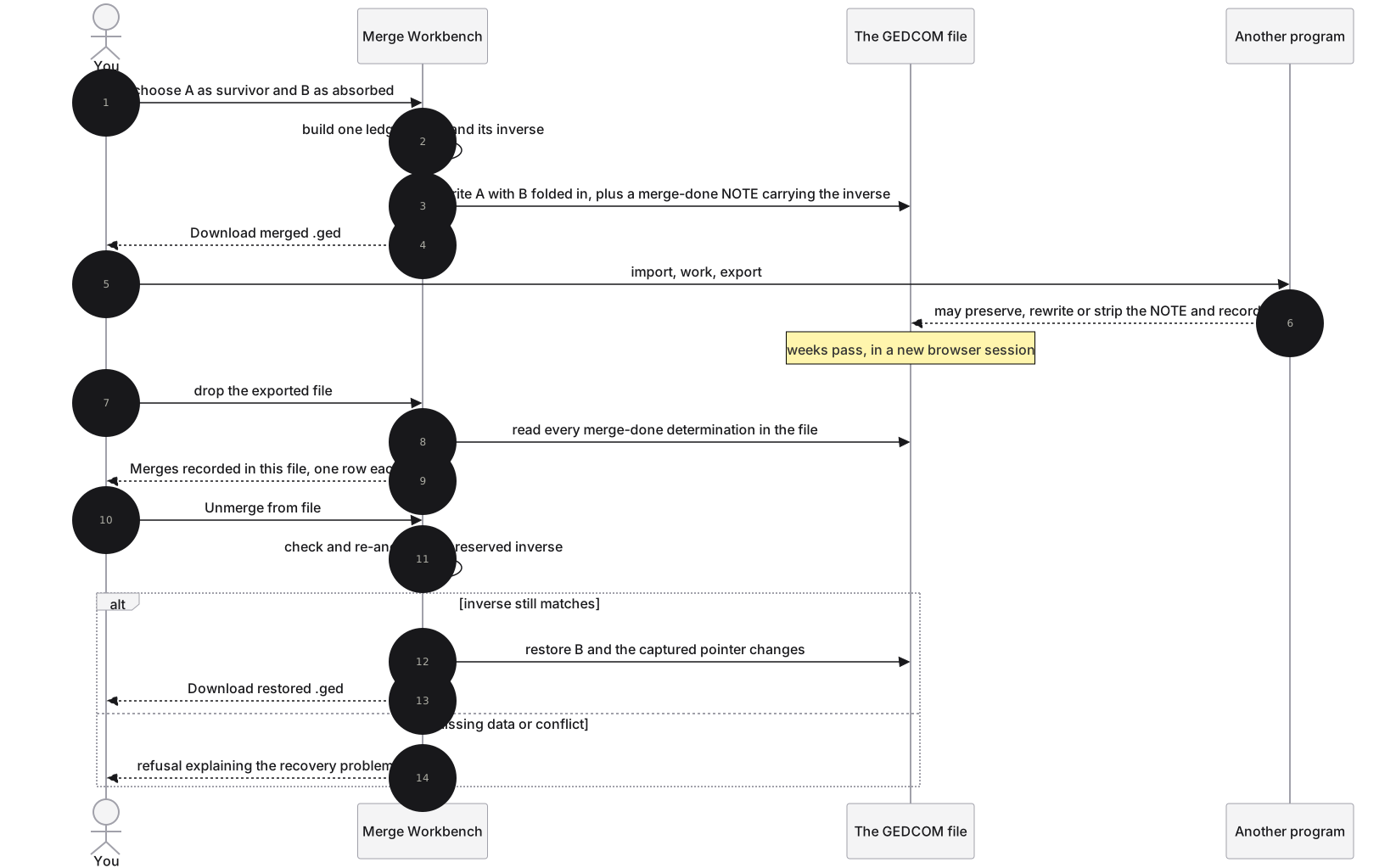
Diagram source
sequenceDiagram
  autonumber
  actor You
  participant W as Merge Workbench
  participant F as The GEDCOM file
  participant P as Another program
  You->>W: choose A as survivor and B as absorbed
  W->>W: build one ledger patch and its inverse
  W->>F: write A with B folded in, plus a merge-done NOTE carrying the inverse
  W-->>You: Download merged .ged
  You->>P: import, work, export
  P-->>F: may preserve, rewrite or strip the NOTE and records
  Note over F: weeks pass, in a new browser session
  You->>W: drop the exported file
  W->>F: read every merge-done determination in the file
  W-->>You: Merges recorded in this file, one row each
  You->>W: Unmerge from file
  W->>W: check and re-anchor the preserved inverse
  alt inverse still matches
    W->>F: restore B and the captured pointer changes
    W-->>You: Download restored .ged
  else missing data or conflict
    W-->>You: refusal explaining the recovery problem
  end
The recovery code can re-anchor some changes in line numbers, text formatting and identifier spelling. It checks tags, values, pointers and child structure against the current records. A changed date, missing neighbour, ambiguous identifier or later dependent merge can cause a refusal. Do not assume an arbitrary third-party round trip remains reversible.
The fix
- Open Merge Workbench and drop the file that holds the merge. No pair needs to be selected.
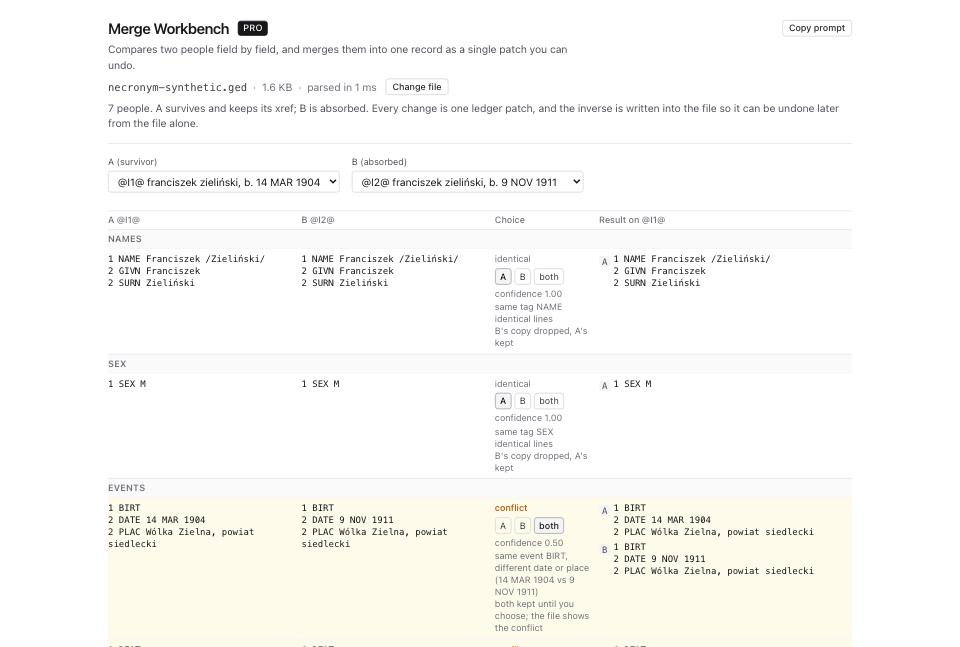
- Read Merges recorded in this file. Each row shows the determination id and
@B@ merged into @A@ on <date>. A row without recoverable data says no readable inverse patch instead of offering a button. - Click Unmerge from file on the row you want to reverse.
- Read the result. The people count goes back up by one, and the page reports anything it had to re-spell, under
remappedandrestoredAs, when a version conversion renamed identifiers between the merge and now. - Click Download restored .ged.
- To see the same thing as raw GEDCOM lines, open Determination Ledger and drop the file. Each determination is a row with its kind, the records it names, the date, the actor, the reason and a confidence.
- Read the lines under the merge row:
NOTE GEDTK-DET/1 merge-done, theGEDTK-PATCHparts, and an_GTK_DETmirror when present. Show all N lines expands a preview longer than 40 lines. Hide lines and Show lines collapse or reopen it. - You can use Revert this determination on a fresh copy in the ledger instead. Read the result: a successful inverse-patch revert restores the merge and removes its carrier notes. Remove the note only, offered after a failed merge revert, does not restore a person and discards recovery evidence. Do not use it as an undo workaround.
- After a successful ledger revert, click Download file with changes. Reload the restored download before further work.
What to check when it worked
- The
INDIcount in File Inspector is back to what it was before the merge. - Both records are in GEDCOM Viewer again, each with its own events, citations and notes.
- The family that listed the survivor now lists the restored record in its original slot, in the original order.
- Determination Ledger no longer lists that merge.
- Compare the restored file with your pre-merge backup. Byte identity can hold for an unchanged GEDCOM Tools merge/export/re-import/unmerge path; third-party edits or conversions need a content comparison too.
- Validate the restored download with GEDCOM Validator and check family pointers with Link Reciprocity Checker. Investigate new errors before replacing your working copy.
What to do when it did not
The unmerge is refused and names another determination. The survivor was itself absorbed by a later merge. Undo the later one first; the message says which id.
The unmerge is refused and names an ambiguity. More than one current identifier may match a saved identifier. Keep both files and compare with the pre-conversion or pre-merge backup to establish the correct mapping. Converting again does not guarantee recovery and can add changes. Resolve only mappings you can verify, or recover from the backup.
The unmerge is refused because a neighbour is missing. The inverse records which records flanked the absorbed one, not just its slot number, and it looks up to 32 records each side. Past that, or when the two sides no longer stand in that order, it refuses rather than guessing a position. Undo the merges in between first.
Merges recorded in this file is empty and you know a merge happened. The merge may come from another program, or an importer may have stripped or rewritten its notes. Check earlier exports and backups. Dialect Report provides dated compatibility warnings, not recovery of missing inverse data.
The file went through the privatiser. Privatising a merged file removes the stored copy of the absorbed record whenever it holds a redacted person's details. The merge stays recorded and re-importable, and that copy of the file can no longer be unmerged. Keep the unredacted original. See how to remove living people before sharing your family tree.
The restored record has a tag spelled the old way. Recovery can restore saved tag spellings even after a version conversion. Validate the output against its declared version and inspect identifiers and pointers. Do not assume one warning accounts for all conversion differences.