How to / Share or move your tree
How to split one branch out of a large family tree
Pick a root and generation limits, review the people and references included, then validate and privatise the extracted GEDCOM before sharing.
Beginner15 minutesChecked against the tools on 6 Sep 2026Uses GEDCOM Viewer, Subtree Extractor and GEDCOM Validator
split-one-branch-out-of-a-large-family-tree.md, 8,640 characters. The same bytes answer at /how-to/split-one-branch-out-of-a-large-family-tree.md.
Your file has 40,000 people and your cousin wants her grandmother's line. Or a DNA match asks for the branch you two share, and you are not sending them your whole tree. Or you want one family group to work on without loading a 16 MB file every time.
Work from a copy. Deleting records without checking incoming references can leave family links and citations pointing at missing records. The extractor removes parsed pointers outside the chosen record set, but it does not redact free text or make the branch safe to publish.
What causes it
A GEDCOM is a graph of pointers, not a list. One person's record carries FAMC to the family they were born into and FAMS to each family they formed. The family records carry HUSB, WIFE and CHIL back. Sources, notes and media are separate records that people point at.
Cut a person out and three things break:
Pointers at them. Every FAM that listed them as a spouse or a child now names a record that does not exist.
Pointers they held. Their citations named sources. If the sources stay behind and the person comes, the extract has dangling SOUR lines.
Families with one member left. A FAM whose only surviving member is one person expresses no relationship inside the extract, and pulling the missing members in would ignore the depth you asked for.
What the walk includes

Diagram source
flowchart TD
  ROOT["Root person"] --> UP{"Direction: ancestors?"}
  ROOT --> DOWN{"Direction: descendants?"}
  UP -- "up = N generations" --> A["Parents, then grandparents, breadth first. An ancestor reached down two lines is recorded once, at the shallowest generation"]
  DOWN -- "down = N generations" --> C["Children, then grandchildren"]
  A --> SET["The person set"]
  C --> SET
  SET --> SIB{"Siblings ticked?"}
  SIB -- "yes" --> SIBA["The other children of every walked person's parent families, added once and not walked further"]
  SIBA --> SET2["The person set, widened"]
  SIB -- "no" --> SET2
  SET2 --> SP{"Spouses ticked?"}
  SP -- "yes" --> SPA["The husband or wife of everyone reached, including the siblings"]
  SPA --> SET3["Final person set"]
  SP -- "no" --> SET3
  SET3 --> FAM{"For each family: how many members are in the set?"}
  FAM -- "two or more" --> KEEP["The FAM record comes across"]
  FAM -- "one" --> LEAVE["Left out and counted on the page"]
  KEEP --> CITE{"Everything these people cite ticked?"}
  CITE -- "yes" --> CIT["SOUR, NOTE, OBJE, REPO and SUBM records, followed through: a source that cites a repository brings the repository"]
  CITE -- "no" --> DROP["Those pointers are dropped and reported by kind"]
  CIT --> PRUNE["Every remaining pointer is checked against the record set. One that does not resolve has its line, and the subtree under it, removed and reported"]
  DROP --> PRUNE
The fix
- Open GEDCOM Viewer and drop the file if you need to find your root person first. Search by name, open the person, and note the xref shown next to their name, such as
@I1@. - Open Subtree Extractor and drop the file. The line under the file name states the scope, for example
20 people in 34 records. - Under Root person, type into Search (it takes a name, an xref or a year) and pick from the Person list.
- Under Walk, set Direction to
Ancestors and descendants,AncestorsorDescendants. - Set Generations up. The label under the box says what that number reaches, for example
parents, grandparents.0adds no ancestors. To keep the root alone, set both depths to0and leave Siblings and Spouses off. - Set Generations down the same way.
- Tick Siblings to add the other children of the parent families of people reached by the walk. This option starts off and does not walk those siblings' descendants or ancestors.
- Tick Spouses to add the spouses of people reached by the walk and the sibling expansion. This option starts off and does not add a spouse's ancestral line.
- Leave Everything these people cite ticked to retain linked notes, sources and media references. With it off, the extractor removes those pointers, but still follows header references. Cited records and header details can mention people outside the selected branch. A
.gedfile contains media references, not the referenced image files. - Read the count strip. It states records, people, families, cited records and characters, plus a breakdown such as
1 root, 6 ancestors. Under it, the page says what one more generation each way would add, so you can see the cost before you pay it.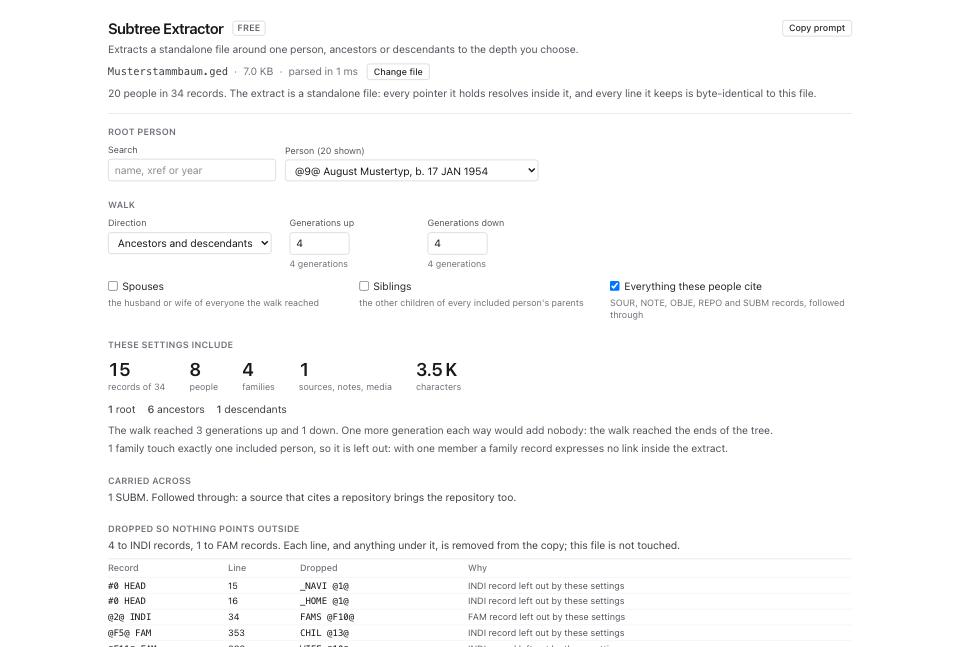
- Read Dropped so nothing points outside. The table has four columns: Record, Line, Dropped, Why, and shows the first 60 removals when the list is longer. This includes parsed pointers your source file left dangling.
- Read Header the extract will carry. The extract's
HEAD.NOTEincludes the root's name, direction, relevant depths, flags, source file name and time. Review this provenance for private details. - Click Extract N records to download. Read any encoding or ledger warning before using the file.
- Open GEDCOM Validator and drop the downloaded extract. Check referential findings and new parse or structural problems. Before sharing, run the extract through Living Person Privatiser and review its downloaded output too.
What to check when it worked
- The people count and root match the branch you intended. Check the selected people, not only the total.
- GEDCOM Validator reports no dangling references. Other referential errors, such as a wrong target record type in the source, can require a separate correction.
- File Inspector on the extract reports 0 parse problems the source did not already have.
- Open the extract in GEDCOM Viewer. The pedigree of your root person stops where you told it to stop, with dashed unknown boxes beyond.
- The extract retains unchanged source lines, including custom tags. It also removes pointer subtrees and updates header information, so the extract as a whole is not byte-identical to a slice of the source.
What to do when it did not
Someone you expected is missing. Check the root, direction, depths and family links. Spouses adds spouses, not their ancestors. Siblings adds siblings of people reached by the walk, not their whole branches. Choose another root or scope if you need those lines.
A family you wanted is left out. The page counts families that touch exactly one included person. Add a generation, or tick Spouses, so the family has two members inside the extract.
Sources came across and you wanted them left behind. Untick Everything these people cite. The page then lists the dropped pointers by kind.
You extracted the root alone and there is no FAM record. That is correct. up = 0 and down = 0 with no flags writes a one-person file with no family record and no FAMS or FAMC line, because there is no relationship to express.
The extract still holds living people. The extractor cuts by relationship, not by privacy. Run Living Person Privatiser on the extract and read how to remove living people before sharing your family tree.
The page says the patch was not built. A large removal can exceed the ledger replay budget. You can still receive an extract, but you do not have an invertible patch for that operation. Preserve the source file and validate the downloaded extract. Inspect any warning that the ledger refused a patch too.
You want the same extract again next month. Every control is a URL parameter: root, dir, up, down, spouses, siblings, cited. Bookmark the address and the settings come back with it.