How to / It will not open, or it opened wrong
How to fix a GEDCOM file that will not open
Inspect an import failure, review structural recovery and its loss report, then validate the output before a test import. Keep the original export.
Beginner15 minutesChecked against the tools on 6 Sep 2026Uses File Inspector, Corrupted File Recovery and GEDCOM Validator
fix-a-gedcom-file-that-will-not-open.md, 9,264 characters. The same bytes answer at /how-to/fix-a-gedcom-file-that-will-not-open.md.
You have a .ged file from a relative, an old backup, or an export that went wrong. Ancestry says the upload failed. Gramps shows an empty tree. Family Tree Maker says the file is not a valid GEDCOM. The file is on your disk, it has a sensible size, and nothing will read it.
A GEDCOM is plain text. An importer can reject it because of malformed structure, an unsupported version or an encoding problem. Inspect the file before deciding whether it contains recoverable records. Recovery cannot reconstruct bytes that are absent from the input.
What causes it
These six conditions are worth checking. They do not explain every import failure, and some affect the meaning of the records as well as their structure.
| Condition | What to look for | Possible cause or caution |
|---|---|---|
| The last record is cut | The file ends mid-line | An interrupted transfer or export; a missing 0 TRLR alone does not prove truncation |
| Level numbers jump | A 9 where a 1 belongs | A buggy exporter, a hand edit |
No 0 HEAD first, or no 0 TRLR last | A missing or misplaced header or trailer | An incomplete export, a hand edit or joined files |
| Unexpected bytes inside the text | Nulls or control characters | Corruption or a wrong decoding choice; boxes alone can be a font problem |
The same @I5@ defined twice | Two 0 @I5@ INDI lines | A merge or exporter fault; references may become ambiguous |
| Mixed line endings | Some lines end \r\n, some \n, some bare \r | Often readable; this alone is not a reason to rewrite the file |
A seventh fault looks the same from outside but is a different repair: the file opens and the names come out as Müller or ????. That is a charset problem, and Encoding Repair is the tool for it. See how to fix garbled characters and accents.
Which tool you need

Diagram source
flowchart TD
  S["A program refuses your .ged file"] --> I["Open File Inspector and drop the file"]
  I --> Q{"Does the Problems table list rows?"}
  Q -- "no rows, and the counts look right" --> V["Run GEDCOM Validator and check destination requirements"]
  Q -- "rows with code invalid-utf8 or charset-mismatch only" --> E["Run Encoding Repair"]
  Q -- "rows with level-jump, missing-trlr, missing-head, duplicate-xref, malformed-line" --> R["Run Corrupted File Recovery"]
  Q -- "the Inspector itself shows nothing at all" --> F["Check file type and available bytes"]
  R --> C{"Review dropped ranges, rewritten lines and record counts"}
  C -- "changes accepted" --> D["Download the recovered file, then validate it"]
  C -- "unexplained loss or uncertain changes" --> L["Keep the original; seek a fresh export or source correction"]
  E --> D
  V --> T["Test a supported file in a separate destination tree"]
The fix
- Open File Inspector and drop the file on the drop target. Parsing happens in your browser. Nothing is uploaded.
- Read the size line for bytes, lines and records, then read Header for version and encoding. The parser severity totals appear in the Problems heading.
- Read Records by type. If
INDIis 20 and you expected 3,000, check the export scope, transfer and record starts. A count of 0 can also mean the file contains no individual records. Neither count establishes where a failure occurred. - Read the Problems table at the bottom. Each row carries a line number when available, a severity, a code and a message. The table displays the first 200 findings. Corrupted File Recovery handles cases such as
level-jump,missing-trlr,missing-head,duplicate-xrefandmalformed-line, but you must review its proposed interpretation. Investigateinvalid-utf8with Encoding Repair.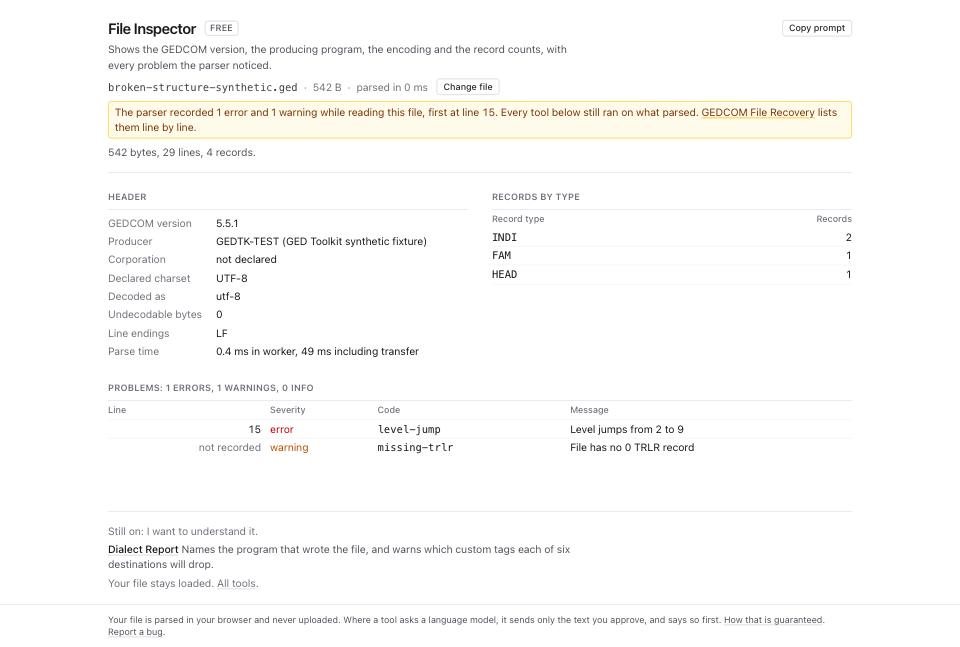
- Open Corrupted File Recovery and drop the same file.
- Read Byte accounting. On
fixtures/public/broken-structure-synthetic.ged, it reads542 kept + 0 dropped = 542; input 542. Every input byte is accounted for.Of those kept bytes, 70 sit in rewritten lines; the output has 541 bytes. The accounting classifies input bytes, including rewritten ones. It does not prove that the recovered facts have the same meaning.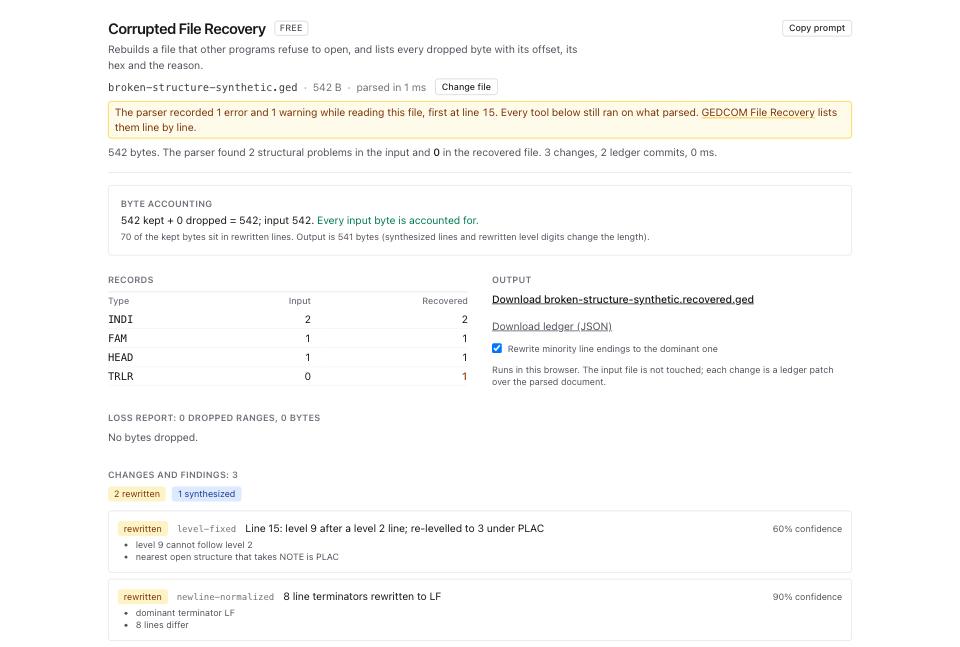
- Read the Records table: Type, Input, Recovered. Investigate changes in
INDIorFAMcounts. In this example both counts stay at 2 and 1, while recovery appends the missingTRLR. - Read Loss report. Rows show offsets, lengths, line references, hex and printable previews, reasons and confidence. The page displays the first 300 ranges. Offsets can be approximate for some charsets. Neither a short unreadable preview nor a large range establishes what you can discard; compare the source text and records.
- Read Changes and findings, which displays the first 300 findings. On this fixture recovery relevels line 15 from 9 to 3 under
PLACat 60% confidence. Check that placement against the source. Download the ledger to inspect the operations beyond the preview. - Rewrite minority line endings to the dominant one starts ticked. Untick it if you do not want that normalization. Recovery builds the output without per-change accept/reject controls. Keep the original if you disagree with a structural rewrite. Stop and review any warning that output characters became
?. - Click the download link. It is named after your file, so on
Musterstammbaum.gedit reads Download Musterstammbaum.recovered.ged. Click Download ledger (JSON) as well if you want the machine-readable record of every change. - Open GEDCOM Validator and drop the recovered file. Read the severity counts at the top:
errors,warnings,infos.
What to check when it worked
- File Inspector on the recovered file reports no error rows in Problems.
- The Records table in Corrupted File Recovery shows the same
INDIandFAMcounts in both columns. - Byte accounting balances, and you have reviewed the rewritten lines as well as dropped ranges.
- The loss report is
0 dropped ranges, 0 bytes, or every range in it is junk you recognise. - Review GEDCOM Validator errors, warnings and infos, then test the output in a separate destination tree. Severity alone does not establish importer acceptance.
What to do when it did not
The recovered file still will not import. Check the destination's version, size and dialect requirements as well as remaining validator findings. Dialect Report uses dated compatibility rules, not a live import test. Follow how to prepare a GEDCOM for Ancestry, MyHeritage, FamilySearch or GEDmatch.
Records are missing from the Recovered column. Recovery changed the interpretation or dropped part of this input. Compare Loss report and Changes and findings against the original before accepting it. A missing-records finding identifies unresolved references; it cannot reconstruct absent records. Ask the sender for a fresh export if records were missing before recovery.
Names are wrong after the repair. Compare the original and output. Encoding Repair may help with a decoding fault. If recovery replaced text with ?, return to the original; the replacement no longer identifies the character.
File Inspector shows no problems and the file still will not open. Inspector does not check every content rule or destination restriction. Run GEDCOM Validator, starting with referential, and read how to check a GEDCOM before you import it anywhere.
You disagree with a recovery change. Keep the original and inspect Download ledger (JSON) for the operations. The page has no selective undo control. Correct the source or obtain a fresh export before using the recovered file; downloading the ledger does not undo the change.