How to / Repair links and dates
How to find every broken pointer in a GEDCOM
Find missing and wrong-type pointer targets, review delete, repoint and placeholder options, then check reciprocal family links in the repaired output.
Intermediate20 minutesChecked against the tools on 6 Sep 2026Uses GEDCOM Validator, Broken Link Repair and Link Reciprocity Checker
find-every-broken-pointer-in-a-gedcom.md, 9,662 characters. The same bytes answer at /how-to/find-every-broken-pointer-in-a-gedcom.md.
The importer said there is no INDI with that pointer, or it listed a family whose child does not exist, or it stopped without saying anything and half the tree arrived.
A GEDCOM holds its relationships as pointers. A family record says 1 CHIL @I5@ and expects a record starting 0 @I5@ INDI elsewhere in the file. An absent target leaves a dangling pointer. An importer may reject the file or omit that relationship, so check both the pointer and the intended family connection.
What causes it
Four ways a pointer loses its target, and they need different repairs.
A record was deleted without updating references. A family can retain a pointer to a person removed during editing or export filtering.
A file was cut. Truncation can remove records while leaving references to them elsewhere in the file. A large dangling count can also come from filtering or faulty renumbering.
Letter case. @i5@ and @I5@ are different xrefs. A hand edit or a merge that lower-cased one side produces a pointer that looks right and resolves to nothing.
The link runs one way. @I5@ says FAMC @F1@, but @F1@ does not list @I5@ as a child. Both targets exist, yet the two sides disagree. A reader that follows only one side can display a different family.
The last case needs a reciprocity check. This site's Validator also reports it as link-not-reciprocated.

Diagram source
flowchart TD
  S["An importer complained about a pointer"] --> V["GEDCOM Validator: filter category to referential"]
  V --> Q{"Which code?"}
  Q -- "dangling-pointer" --> B["Broken Link Repair"]
  Q -- "link-not-reciprocated" --> C["Link Reciprocity Checker"]
  Q -- "pointer-type" --> T["The target exists but is the wrong kind of record"]
  Q -- "void-pointer" --> N["Check version: GEDCOM 7 permits the null pointer @VOID@"]
  B --> K{"Is there a candidate target?"}
  K -- "differs by letter case only" --> RP["Repoint"]
  K -- "none, and an unresolved slot must remain" --> PL["Review a labelled placeholder; it does not prove an identity"]
  K -- "reference is obsolete" --> DL["Review deletion and its lost link"]
  RP --> O["Apply and download, then check reciprocity on that output"]
  PL --> O
  DL --> O
  O --> C
  C --> AD["Review remaining one-way links before adding or removing pointers"]
The run
Numbers below are from fixtures/public/broken-links-b5.ged, a 723-byte file holding 11 records and 13 pointers.
- Open GEDCOM Validator and drop the file. The three counts across the top read
errors 5,warnings 3,infos 2. - Read the category table under the counts. On this file
referentialholds 7 andlogicalholds 3. Click referential in the left column to filter to it. - Set the code select to
dangling-pointer (5). Every remaining row is a pointer with no target. - Read the rows. Each names a line, an xref and the pointer:
FAMC points to @F77@, no record with xref @F77@ existsat line 19,SOUR points to @S88@at line 26,OBJE points to @M42@at line 31,CHIL points to @i5@at line 39 andCHIL points to @I99@at line 40.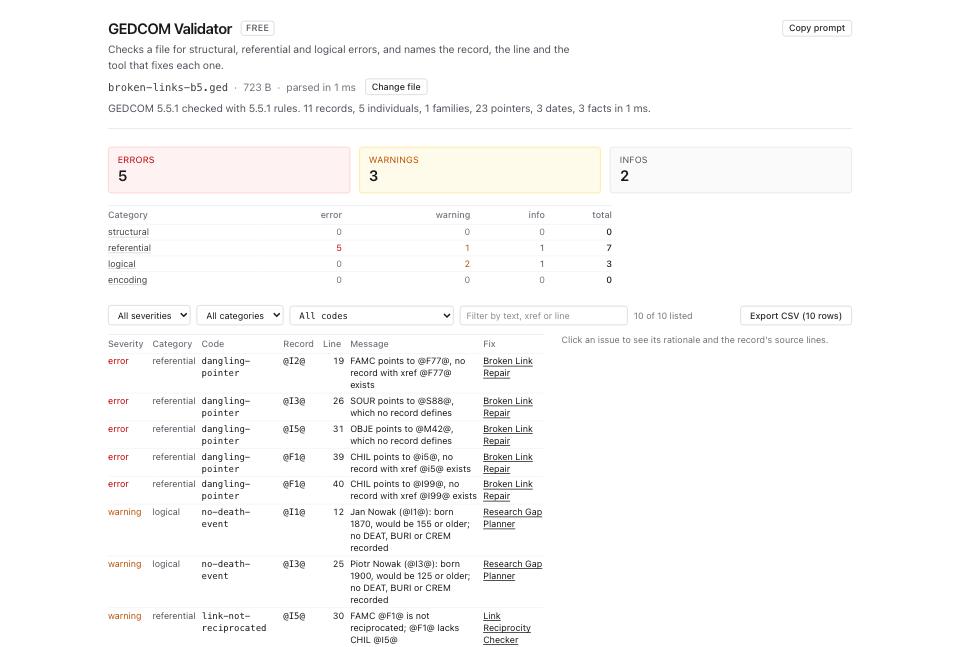
- Open Broken Link Repair and drop the same file. The header line reads
13 pointers across 11 records, then5 broken pointersand3 orphaned records. Its pointer count differs from Validator's rule-check count. Repair plans and orphan lists each cover at most 2,000 rows; totals cover the full scan. - Read the Broken links list. Each card names the record and pointer, a
no such recordbadge, the confidence and the line, its recommendation on the right, and a Repair select that starts atleave as is. - Read the card for line 39,
CHIL @i5@. ChooseRepoint @F1@ line 39 from @i5@ to @I5@ (recommended)to preview- 1 CHIL @i5@and+ 1 CHIL @I5@. The rationale cites the case-only difference and correctINDItype at 90% confidence. Check the intended person's identity; selecting the option only previews the change until you press Apply. - Read line 40,
CHIL @I99@. Theload bearingbadge marks a family-member slot. The recommendation offers a placeholder at 0.70 confidence against deletion at 0.60. A placeholder preserves an unresolved slot and a reciprocal link; it does not recover the person's name or prove that the relationship is correct.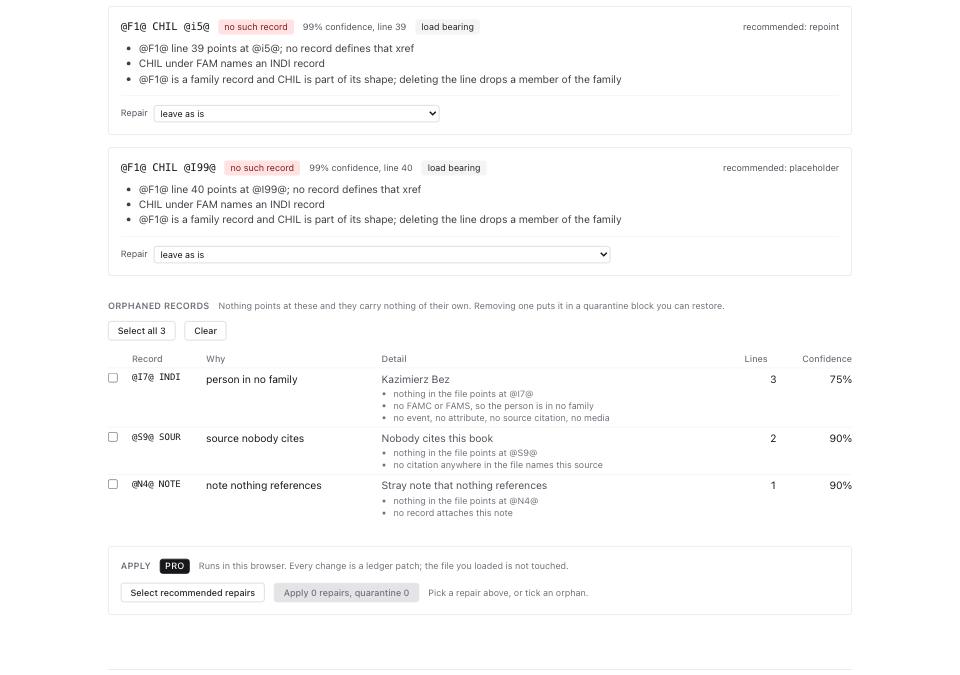
- Set each Repair select, or use Select recommended repairs and review the choices before applying. On this fixture the five recommendations delete three missing references, repoint the case mismatch and create one placeholder. Deletion removes information about a link even if its target is absent.
- Read Orphaned records before selecting any for quarantine. The fixture lists
@I7@ INDIasperson in no familyat 75%,@S9@ SOURassource nobody citesat 90%, and@N4@ NOTEasnote nothing referencesat 90%. A person outside a family can still carry research or other links. Leave these unticked unless you intend to remove them from the active tree. Quarantine stores selected records in the output; reload that output here to use Restore quarantined records. - For this example, press Apply 5 repairs, quarantine 0. Read the result's remaining broken and one-way counts, skipped repairs and encoding warnings. Click Download broken-links-b5.links-repaired.ged and keep the original plus Download ledger (JSON).
- Open Link Reciprocity Checker and load the downloaded repair output. With those five recommendations and no quarantine, the fixture now has no broken or one-way links. On the original, the checker reports four one-way links, including
@I5@'s missing reciprocalCHILat 0.80 confidence; Validator reports that as a warning too. The case repair resolves it, so do not reload the original and add a redundantCHIL. - For one-way findings that remain in your output, review Repair and its add/remove preview, then press Apply N fixes and build file and download the new result. The checker shows 200 detailed findings and offers plans for the first 2,000; Select recommended fixes can select undisplayed plans. Download all N as CSV includes the full finding list. Review omissions and recheck each output before another batch.
What to check when it worked
- GEDCOM Validator on the repaired file reports 0 rows under code
dangling-pointer. - Broken Link Repair reports
Every pointer names a record that exists.in its header line. - Link Reciprocity Checker reports 0 for
incomplete-entry, or every remaining one is a deliberate one-way link. - Review person counts and family membership. Removing
CHILchanges membership without deleting the person's record; a placeholder can increase the individual count. - Test the output in a separate destination tree and check the repaired families. Valid references do not establish genealogical truth or guarantee importer support.
What to do when it did not
Many dangling targets share a prefix. Check truncation, export filters and renumbering before choosing a repair. Compare File Inspector counts with the sender's intended export. GEDCOM error messages, decoded covers structural checks.
A pointer resolves but the validator still complains. Read the code. pointer-type means the target exists and is the wrong kind of record, such as a CHIL naming a SOUR. void-pointer means the file wrote @VOID@ on purpose, which 7.0 allows and 5.5.1 does not.
Repointing produced an unexpected family connection. Multiple families can be legitimate, but a case match is not proof of identity. Reload the original and inspect the people and relationship before choosing repoint, placeholder or no repair.
You want another GEDCOM 7 conformance check. The external js-gedcom checker offers an additional check. Review its documentation and privacy behavior before loading a private file.
An image is missing but its OBJE pointer resolves. This check covers references to GEDCOM records. It does not establish that an OBJE.FILE path points to an available photograph. See how to find and fix missing media links.