How to / Sources and next research steps
How to turn free-text source notes into real citations
Recognize supported archive identifiers, review source-record proposals, and preserve the original citation wording without treating a parsed reference as proof.
Advanced30 minutesChecked against the tools on 6 Sep 2026Uses Citation Parser, Note Structurer and Determination Ledger
turn-free-text-source-notes-into-real-citations.md, 10,917 characters. The same bytes answer at /how-to/turn-free-text-source-notes-into-real-citations.md.
Your file contains archive references in notes or free-text citations: Geneteka, Dołubowo parish, act 28 (1879), a FamilySearch ark identifier, a National Archives microfilm roll, a Polish archive signature. You can preserve that wording while adding structured source references. First check that each identifier points to the intended record and supports the fact you cite.
What causes it
A GEDCOM citation has two shapes. A pointer citation, 2 SOUR @S6@, names a SOUR record that carries the title, the author, the publisher and the repository. A free-text citation, 2 SOUR Geneteka, Dołubowo parish, act 28 (1879), carries a string.
Both forms can carry useful evidence. Programs can display and count free-text citations, but support for grouping them or recognizing archive identifiers varies. A source record lets several citations share one source description while retaining an entry-level reference on each citation.
Citation Parser recognizes nine identifier schemes and proposes this structure for supported references. It does not retrieve archive records, verify their contents or establish a person's identity. Keep an unchanged input copy before applying proposals.
Where the identifier sits decides what happens to it

Diagram source
flowchart TD
  ID["A string holding an archive identifier"] --> WHERE{"Where does it sit?"}
  WHERE -- "a SOUR with a text value instead of a pointer" --> EXIST{"Does a record in this file already carry that identifier?"}
  EXIST -- "no" --> MINT["Mint a SOUR record, repoint the citation, keep the original on PAGE or NOTE"]
  EXIST -- "yes" --> REPOINT["Repoint the citation at that record. Mint nothing"]
  WHERE -- "TITL, TEXT, PUBL, AUTH, ABBR, CALN or NOTE inside a SOUR record" --> WRITE["Write the identifier onto that record as REFN, or EXID in 7.0. No text moves"]
  WHERE -- "a PAGE value, or a note under a pointer citation" --> STOP1["Report it and stop. The identifier names the entry, not the source"]
  WHERE -- "a NOTE with no source record above it" --> STOP2["Report it and stop. Promoting would invent a citation the file never made"]
  MINT --> KEEP["The original string is kept twice: on the citation, and as the new record's TEXT"]
  REPOINT --> KEEP
The PAGE rule is the one that matters most on real exports. An Ancestry census citation writes Year: 1930; Roll: 803; FHL microfilm: 2340532 into PAGE, and the next citation to the same census writes a different roll and a different film. Writing either film onto the source record would assert that the record is that roll. One real Ancestry export holds 137 such identifiers: the tool reads every one, reports them, and proposes nothing.
The fix
- Open Citation Parser and drop the file. The line under the file name states the scope, for example
GEDCOM 5.5.1: 16 free-text citations, 12 carrying an identifier the library reads. 15 identifiers across every citation, page, note and source field. Scheme library version 1. - Read the counts under it: source records to add, identifiers to write onto an existing record, and citations left untouched. Additional counts appear for identifiers in
PAGEvalues or notes when those findings exist.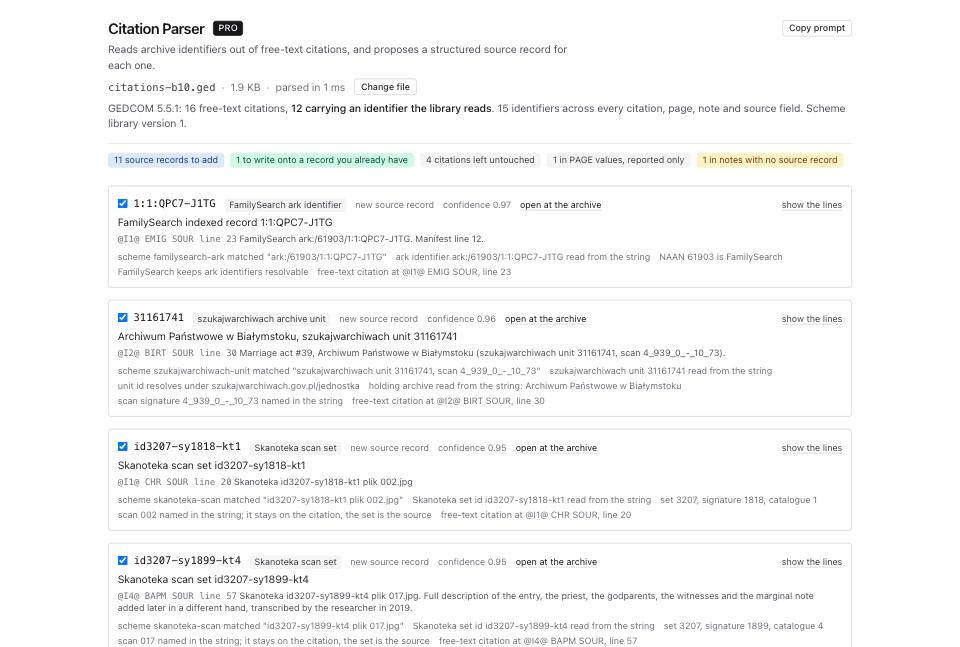
- Work through the proposals. Each shows the identifier, the scheme that read it, what it will become (
new source recordor a write onto an existing one), a confidence, and a rationale list. The first rationale line names the scheme and quotes the exact substring it matched on. - Click open at the archive on any proposal that has one. Three of the nine schemes resolve to a record URL: FamilySearch ark identifiers, Skanoteka scan sets and szukajwarchiwach units. The rest give a search URL or no link at all, and the page says which.
- Click show the lines to see the exact GEDCOM lines the proposal adds and removes, before you accept it.
- Proposals start selected. Untick any proposal you do not want. The page displays at most 200 proposals and can leave proposals beyond that limit selected. If it reports more than 200, do not apply the batch: you cannot review the hidden proposals in this view. Work on a smaller export from your genealogy program, or retain the input until you can review the full batch.
- Open Scheme library, version 1 and click show 9 schemes to read what each pattern requires. Every scheme carries an example its own pattern reads and a source URL with the day it was checked by hand.
geneteka-actneeds an act number and either a parish or a year, soGeneteka Dołubowo (1891)matches nothing and is left alone. - Click Apply N proposals. Each proposal is one ledger entry, applied against the document the previous one produced.
- Download the new GEDCOM and Download the ledger for the change record. If the output reports characters that the original encoding could not represent, it wrote those characters as
?. Stop and inspect them. Start again from a verified UTF-8 copy if you need those characters.
What a promotion writes
A promoted citation becomes a pointer at a new record:
2 SOUR @S6@
3 PAGE 1900 US census, NARA microfilm publication T623, roll 55, page 12B.
and the new record carries the structure:
0 @S6@ SOUR
1 TITL NARA microfilm publication T623, roll 55
1 AUTH National Archives and Records Administration
1 REPO @R4@
2 CALN T623/55
1 REFN T623/55
2 TYPE NARA microfilm publication and roll
1 TEXT 1900 US census, NARA microfilm publication T623, roll 55, page 12B.
1 NOTE GEDCOM Tools b10-citation-parser, scheme library 1: promoted from a free-text citation by scheme nara-publication, confidence 0.90.
Three things are worth noticing. AUTH appears only when the scheme names an issuing body, so a community index gets none. REPO is a real repository record, minted once per holding body and reused. The original string is kept twice, on the citation and as the record's TEXT, so nothing you typed is lost. In a 7.0 file the identifier goes into EXID with a TYPE set to the authority URI, so the two together form the record URL.
When the note is prose, not an identifier
Some notes carry reasoning rather than a reference: a hypothesis, a correction, a negative finding, an assessment of a source, an open question. Note Structurer reads those.
Use Use the rules only for browser-local analysis of markers in three languages. Read N notes with the model sends the selected notes to the configured model provider after approval. Each request includes a whole note plus its context shape, note count and language; names and private details inside the note go with it. Read the disclosure before choosing that option. A verbatim quote of at least 12 characters must support each accepted claim. The page lists dropped claims and their reasons. A matching quote establishes what the note says, not whether the note is true.
Accept a claim with Accept claim and it is written into the file as a determination. Reject it with Reject claim and nothing is written. Click Download file with N determinations when you are done.
What to check when it worked
- Every citation you accepted now resolves to a
SOURrecord. Run Broken Link Repair and confirm 0 broken links. - Run GEDCOM Validator on the output and confirm no issue code the input did not already have.
- Search the output for one of your original strings. It is still there, on the citation and on the new record.
- Run Citation Parser again on the output. Accepted promotions should not recur. Proposals you unticked can remain, and unsupported citations should retain their original wording.
- Open Determination Ledger on a file you took through Note Structurer. Every accepted claim is a row with its kind, its records, its date and its confidence, and the GEDCOM lines that carry it are printed under the row.
- Run Tree Health Score before and after. The sourcing component counts facts with a citation, and promoting free text does not change that number: it changes what the citation can do.
What to do when it did not
A citation you can read was left untouched. Its shape does not match any of the nine schemes precisely enough. Each scheme has a guard that stops it firing on prose, and a guard that refuses is doing its job. Add the missing part to the string, usually an act number or an archive name, and run again.
An identifier in a PAGE value was only reported. That is the rule, not a limitation. The identifier names the entry, not the source, and writing it onto the source record would make a false claim about the record.
Two citations name the same act and you got two records. They should share one. Check that both strings spell the identifier the same way: proposals are grouped by scheme and identifier, so a difference in the identifier itself splits them.
You want to undo a promotion. Return to the unchanged input copy. The parser offers a separate ledger JSON download for inspecting the changes, but its page does not provide an undo or ledger-import control. Do not rely on that download as your only backup.
A claim from a note was dropped by the gate. The page shows the text that failed and the reason. A quote that is not a verbatim span of the note is a quote the model rewrote, and a rewritten quote cannot be checked against the file.
You want to choose the next source to search. Research Gap Planner lists gaps and possible source collections based on recorded dates, places and relationships. It does not fetch records or establish that an archive holds a matching entry. Follow the research-planning guide.