How to / Start here
How to work out what a GEDCOM file actually contains
Someone sent you a .ged and you have no program to open it. Read the version, the producer, the charset, the counts, the custom tags and the people, in order.
Beginner20 minutesChecked against the tools on 6 Sep 2026Uses File Inspector, GEDCOM Viewer, Dialect Report, Tree Health Score and Relationship Calculator
work-out-what-a-gedcom-file-actually-contains.md, 9,187 characters. The same bytes answer at /how-to/work-out-what-a-gedcom-file-actually-contains.md.
A relative emails you a .ged file. You have no genealogy program, or you have one and it wants to import the file into your tree before it will show you anything, and you are not ready for that. You want to look first.
Opening it in a text editor gives you thousands of lines like 1 BIRT and 2 DATE 14 MAR 1904. That is the format, and it is readable, but not at 40,000 lines.
What causes it
A GEDCOM uses numbered lines for records and their nested details. Level 0 starts a record. Level 1 belongs to it, and level 2 belongs to the preceding level-1 structure. Tags describe the type of data; cross-references like @I1@ connect records.
The header at the top declares the producing program, GEDCOM version and, in older versions, character set. It does not provide a reliable people count. File Inspector computes record counts and shows the declarations beside the decoding it used.
The reading order

Diagram source
flowchart TD
  Q["A .ged file you have not seen before"] --> Q1{"What do you want to know?"}
  Q1 -- "how big, what version, is it damaged" --> A["File Inspector: version, producer, charset, line endings, counts, parse problems"]
  Q1 -- "who is in it" --> B["GEDCOM Viewer: searchable people list, person pages, pedigree, timeline"]
  Q1 -- "what program wrote it and what its quirks are" --> C["Dialect Report: producer, custom tags with samples, dated destination guidance"]
  Q1 -- "how complete and how well sourced" --> D["Tree Health Score: three components with their weights"]
  Q1 -- "how am I related to these people" --> E["Relationship Calculator: kinship term, Ahnentafel, shared ancestors"]
  A --> A1{"Problems: any errors?"}
  A1 -- "yes" --> FIX["Review the findings before choosing a repair"]
  A1 -- "no" --> B
  C --> C1{"Custom tags carrying real data?"}
  C1 -- "yes" --> C2["Read sample values and verify them in a destination test import"]
  C1 -- "no" --> D
  B --> D
  D --> E
The fix
- Open File Inspector and drop the file. Nothing is uploaded; the file is parsed in your browser.
- Read Header. GEDCOM version identifies
5.5,5.5.1or7.0, or readsunknownfor a missing, malformed or unsupported declaration. Producer reports the exporter declaration, such asAHN (Ahnenblatt) 2.99g. Compare Declared charset, Decoded as and actual names. Different labels can reflect aliases or a byte order mark. Undecodable bytes above 0 merits investigation. Line endings describes terminators, not the file's operating-system history. - Read the size line.
fixtures/public/Musterstammbaum.gedreads7,175 bytes, 396 lines, 34 records. - Read Records by type:
INDIfor people,FAMfor families,SOURfor source records,NOTEfor note records,OBJEfor media records andREPOfor repositories. These counts cover level-0 records. The example has 20 individuals and no source records, but it has 20 inline source citations. Inline notes and media can also exist without separate records.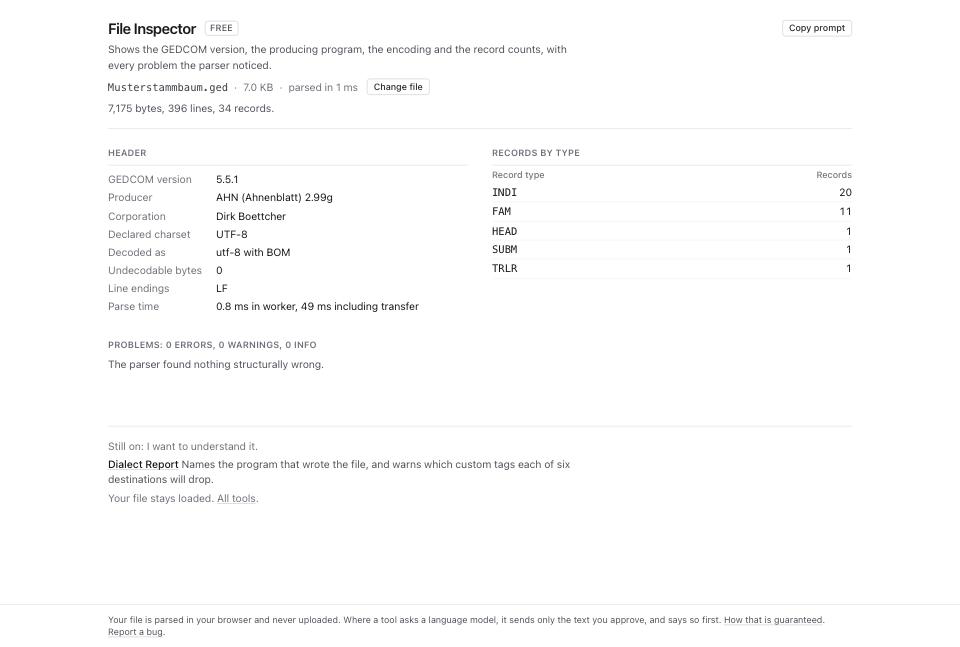
- Read Problems. Zero findings means no parser problem was detected, not full conformance or a complete export. The parser continues through malformed lines. Review errors and encoding findings before trusting the interpretation; the table previews the first 200 rows. See how to fix a GEDCOM file that will not open.
- Open GEDCOM Viewer and drop the same file. The left column shows people with available birth and death years. Use the Search name or xref field (labelled Search people) and Sort people. Search covers the indexed list before the 500-row display cap.
- Click a person. The right column shows every
NAMEas written with each subtag labelled, every event with date, place, age, cause, citations and notes, the parents with siblings, each spouse family with its children, the notes, and any tag no other section shows. - Below the person, read Pedigree, with 2 to 5 ancestor generations. Click a populated box to re-root it. The pedigree follows the first
FAMCand first parent in each spouse slot. Read confidence tooltips for multiple links, missing reciprocal links, sex-role mismatches or cycles. - Read the Timeline. It orders the person's own events, their marriages, their children's births and their parents' and spouses' deaths, so a life reads as a sequence rather than a list of fields.
- Open Dialect Report and drop the file. Read the Producer estimate, confidence and evidence. File facts includes people, families, custom tags and
NOTE / SOUR / OBJEoccurrences. Occurrence counts can include nested structures, so do not compare them as if they were Inspector's level-0 record counts. - Read Custom tag inventory for counts, record types, parent paths and up to three sample values. Use the dated destination guidance to identify fields to check in a test import. A custom tag's presence does not establish that a destination will drop it.
- Open Tree Health Score. Expand each component to read its weight, arithmetic, rationale and a shortlist of records that lower the score. The score summarizes these checks; it does not measure whether the genealogy is true.
- Open Relationship Calculator. Pick a Home person and a comparison person. The modes are Relationship, Ahnentafel, Shared ancestors and Cousin calculator. Read relationship paths and supporting details in the relevant mode, then check the underlying family links.
What to check when it worked
- The
INDIcount in File Inspector matches what the sender told you. - Names look correct under the reported decoder, and Undecodable bytes is 0. Matching labels alone cannot detect double encoding.
- Problems has no error rows.
- You can find yourself, or a person you know, in GEDCOM Viewer, and their dates are what you expect.
- You have identified meaningful custom-tag values to check in the destination before migrating the tree.
- The health score gives you a number to quote back to the sender.
fixtures/public/Musterstammbaum.ged, a 20-person file, scores 81.73: completeness 91.84%, sourcing 50%, consistency 100%.
What to do when it did not
File Inspector shows fewer people than you expected. Check the sender's export filters and branch selection, then malformed record starts or truncation. If findings support structural recovery, compare its input and recovered counts. Recovery cannot recover people absent from the input.
Names are unreadable. Compare encoding, original characters and font support. Run Encoding Repair and read how to fix garbled characters and accents before accepting proposed changes.
The producer is unknown. Inspect HEAD.SOUR and the report's evidence. Missing or unrecognized declarations and inconclusive signatures can leave the producer unidentified. You can still read any records the parser and viewer recognize.
The people list is capped. Lists over 500 rows render the first 500 and say so. Search filters before the cap, so searching a name finds it in a 40,000-person file.
A pedigree box says father unknown when you know the father. Check for missing FAMC, family or parent records, missing HUSB, or a different first parent family. Use Broken Link Repair for absent targets and Link Reciprocity Checker for one-way family links.
You want to know what to research next. Research Gap Planner suggests gaps and research targets from the tree's dates, places and citations. Treat archive and record-set suggestions as leads to verify; available detail depends on the file and coverage.
The file has people in it who are alive. Before you forward it to anyone, read how to remove living people before sharing your family tree.