How to / Start here
Read a GEDCOM without installing anything
Someone emailed you a .ged file. Open it as people, families and a pedigree in a browser tab, with nothing uploaded and nothing installed.
Beginner10 minutesChecked against the tools on 6 Sep 2026Uses GEDCOM Viewer and File Inspector
read-a-gedcom-without-installing-anything.md, 7,477 characters. The same bytes answer at /how-to/read-a-gedcom-without-installing-anything.md.
A relative sent a .ged file. Double-clicking it does nothing, or opens a text editor showing several thousand lines that start with numbers. You want to know who is in it before you decide whether to install a genealogy program.
The advice at the top of most search results is to rename the file to .txt and read it. That works and tells you almost nothing: the file is a flat list of records, and the relationships between them are pointers you would have to follow by hand.
What causes the file to look like that
A GEDCOM uses numbered lines to describe records and their details. Each line starts with a level, can include a record identifier, then carries a tag and an optional value.
0 @1@ INDI
1 NAME Max /Mustermann/
1 SEX M
1 BIRT
2 DATE 1 JAN 1980
1 FAMC @F1@
Level 0 starts a record. Level 1 lines belong to it. Level 2 lines belong to the level 1 line above them. @1@ is this person's identifier, and @F1@ is a pointer to a family record somewhere else in the file. Nothing in the text puts the family next to the person, which is why reading it as text is hard and why a program that follows the pointers makes it easy.
Two questions usually come first, and they need different tools. What is in this file at all, and who are these people.

Diagram source
flowchart TD
  F["A .ged file arrived"] --> Q{"What do you want to know?"}
  Q -- "how many people, what program made it, is it damaged" --> I["File Inspector"]
  Q -- "who these people are and how they connect" --> V["GEDCOM Viewer"]
  I --> P{"Does Problems list errors?"}
  P -- "yes" --> R["Review the errors and keep the original before repairs"]
  R --> V
  P -- "no" --> V
  V --> S["Search a surname, open a person, read the pedigree"]
The steps
Numbers below are from fixtures/public/Musterstammbaum.ged, a 7,175-byte German export.
- Open File Inspector and drop the file on the drop target. The file is read by JavaScript in your browser. Nothing is uploaded, and the page makes no network call with the file in it.
- Read Header. On this fixture GEDCOM version reads
5.5.1, Producer readsAHN (Ahnenblatt) 2.99g, Declared charset readsUTF-8, Decoded as readsutf-8 with BOMand Line endings readsLF. The producer declaration helps you interpret extension tags. - Read Records by type. On this fixture
INDI 20,FAM 11, thenHEAD,SUBMandTRLRat 1 each. TheINDIcount measures individual records in this export, which may cover only part of a tree. - Read Problems. On this fixture the title reads
Problems: 0 errors, 0 warnings, 0 info. Review errors before trusting the displayed relationships. Informational rows do not require repair before reading. The table displays the first 200 findings; GEDCOM error messages, decoded explains the codes and possible next steps.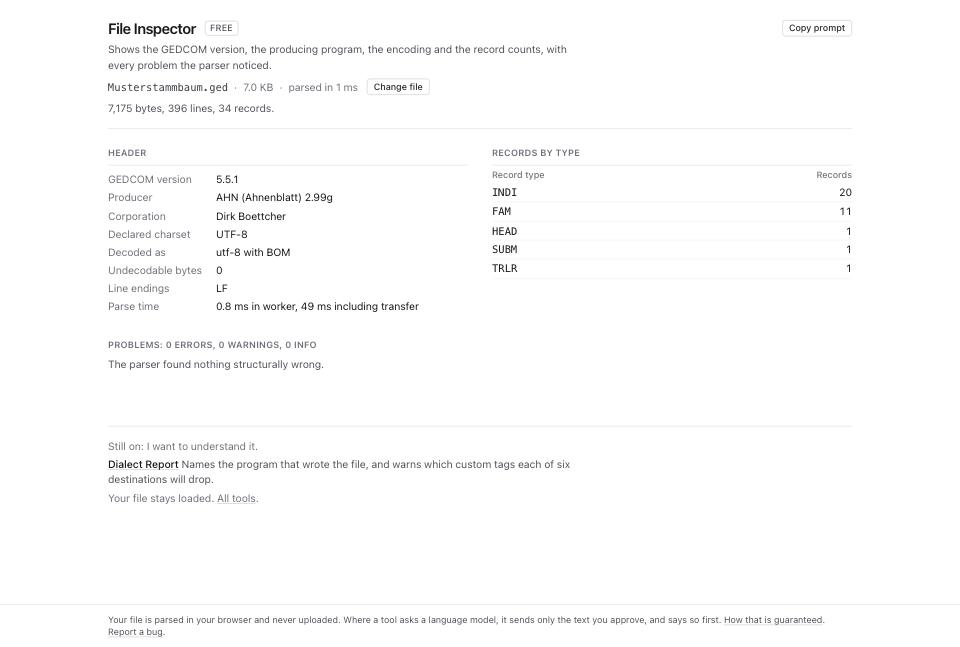
- Open GEDCOM Viewer and drop the same file. The header line reads
20 people, 11 families. - The left column is the people list. Use Search name or xref to filter it, and the Sort people select to order by Surname, Given name, Birth, Death or Xref. The list displays the first 500 matches; search covers the indexed people before that display cap.
- Click a row. The right panel fills with that person: their name as the file wrote it, their events with dates and places, and their family links.
- Read Parents and Spouses and children in the person panel. Each name there is a link; clicking one moves to that person.
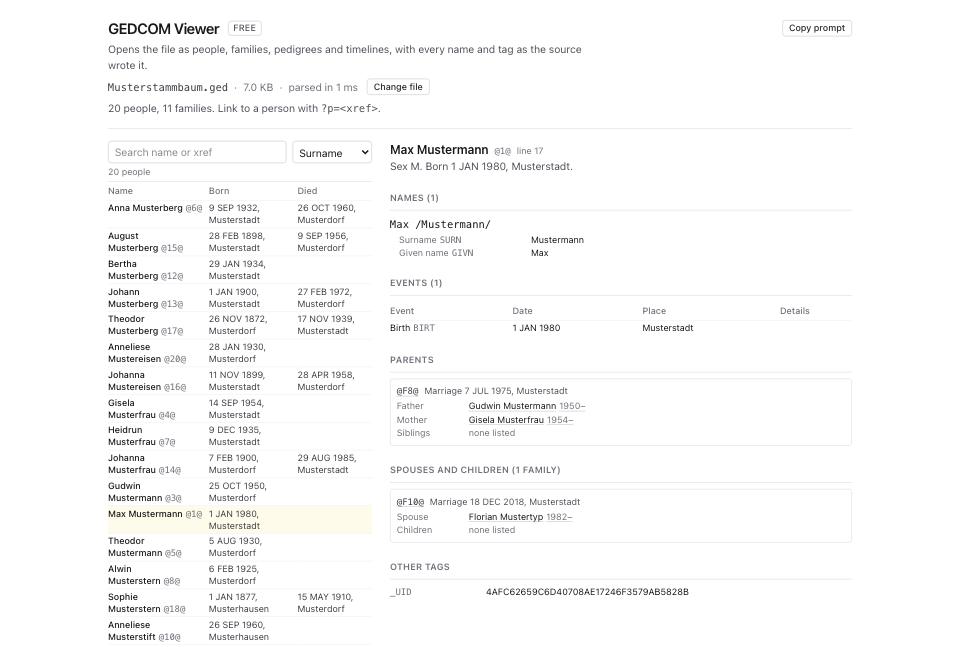
- Scroll to Pedigree. Set Generations up to 4 to see great-great-grandparents. Click a populated box to select that person; empty boxes have no person to open.
- Read Timeline below it. It includes the person's events and dated events involving family members. Ages appear when the available dates support a calculation.
- Copy the address bar to preserve the selection, such as
?p=@1@. The URL contains no GEDCOM data. After a reload, or when sharing that URL, load the same file to use the saved selection.
What to check when it worked
- Records by type in File Inspector shows an
INDIcount close to what the sender described. A lower count calls for checking export scope and malformed or missing records; it does not prove truncation. - The Problems table is empty, or every row is severity
info. - On this fixture the viewer and Inspector both say 20 people and 11 families. Duplicate or missing identifiers can make the viewer's indexed counts differ from the Inspector's raw record counts.
- Names show their accents.
Müllerreading asMüllersuggests an encoding problem; how to fix garbled characters and accents covers it. - A person you know appears with the right parents when you click through.
What to do when it did not
The page says nothing loaded. Check that you selected the intended file. In a text editor, look for the opening 0 HEAD and numbered GEDCOM lines. A different opening can mean a damaged header, an archive or a different file format; the extension alone proves nothing.
The viewer lists people with no name. The NAME lines are absent or malformed. Run GEDCOM Validator and read the structural category.
Clicking a person shows no parents when you know they have some. Check for missing FAMC, absent family or parent records, and one-way links. With several parent families, the pedigree uses the first FAMC; read its confidence tooltip. How to find every broken pointer in a GEDCOM covers pointer and reciprocity checks.
You want the data as a spreadsheet. Open Format Converter and use Individuals CSV or Families CSV. It also offers JSON exports. These are data exports, not the viewer's pedigree layout.
The file is large and the page takes a while. Parsing runs in a worker. Read Parse time in the Inspector's Header table. Search can narrow the viewer's list, but available browser memory still limits file size.