How to / Is this the same person twice
How to find and merge duplicate people in a GEDCOM
Review duplicate candidates and their evidence, merge confirmed pairs, and export the decisions and undo data. Keep a pre-merge backup.
Intermediate30 minutesChecked against the tools on 6 Sep 2026Uses Duplicate Individual Finder, Merge Conflict Arbitration, Merge Workbench and Determination Ledger
find-and-merge-duplicate-people-in-a-gedcom.md, 10,278 characters. The same bytes answer at /how-to/find-and-merge-duplicate-people-in-a-gedcom.md.
Your great-grandmother is in the tree twice. One copy came from a cousin's GEDCOM, one you typed yourself, and they spell her surname differently. Multiply that by every import you have ever made. You want the duplicates found, and you want to be able to undo any merge you get wrong.
What causes it
Duplicates arrive four ways, and each leaves a different fingerprint.
Two imports of overlapping trees. The same person appears under two xrefs with slightly different dates. Names match, dates are close, places match.
A one-way family link. A FAM record lists WIFE @I47@ while @I49@ claims FAMS @F17@ without a matching link. This can indicate a duplicate or a wrong relationship. A probable-duplicate reciprocity finding carries +0.45, the largest positive weight in this scorer. It does not prove identity.
Transliteration. Телешкевич and Teleszkiewicz can represent the same surname in different scripts and spelling conventions. An exact string comparison misses that possible relationship; shared spelling or transliteration still does not prove personal identity.
Someone typed the person again because search did not find the first copy.
There is another pattern to investigate: two children of the same parents carrying the same given name, because the first one may have died. Read how to tell a duplicate from a child named after a dead sibling. The finder can assign a necronym verdict alongside the numeric score.
Where a pair goes

Diagram source
flowchart TD
  PAIR["A candidate pair"] --> N{"Same parents and the same given name?"}
  N -- "yes" --> NEC{"Can the two lives have been sequential?"}
  NEC -- "yes" --> V3["Verdict: necronym. Merge is not offered"]
  NEC -- "no, the birth dates overlap" --> SC["Score the pair"]
  N -- "no" --> SC
  SC --> T{"Score at or above the threshold slider?"}
  T -- "yes" --> V1["Verdict: merge candidate"]
  T -- "no, and at or above 0.30" --> V2["Verdict: below threshold, hidden until you ask"]
  V1 --> A{"Are you sure?"}
  A -- "yes" --> W["Merge Workbench: review fields and preserve a backup"]
  A -- "not sure" --> ARB["Merge Conflict Arbitration: both sides argued"]
  A -- "no" --> DIS["Dismiss: writes merge-rejected into the file"]
  V3 --> DIS
  ARB --> W
  ARB --> DIS
  DIS --> EX["Build and download the determination GEDCOM; reload it before the next tool"]
  W --> MX["Download merged GEDCOM; reload it before the next tool"]
The fix
- Keep an untouched backup, then open Duplicate Individual Finder and drop a working copy. Read the people, family, candidate-pair and scored-pair counts under the heading.
- Read the three counts:
merge candidates,necronyms,below threshold. - Work the merge candidates from the top. Each pair shows both records side by side with name, xref, line, sex, birth, death, places, parents, spouses and children, then a table with three columns: Weight, Signal, What it compared. The scorer sums the weights and clamps the result to 0 through 1.
- Read the signal table before the score.
surname match +0.25,given name match +0.20,birth same-year +0.20andbirth place match +0.10sum to 0.75. These signals can come from the same copied source; they are not independent evidence or a 75% probability of identity. Compare citations and conflicting relationships before merging.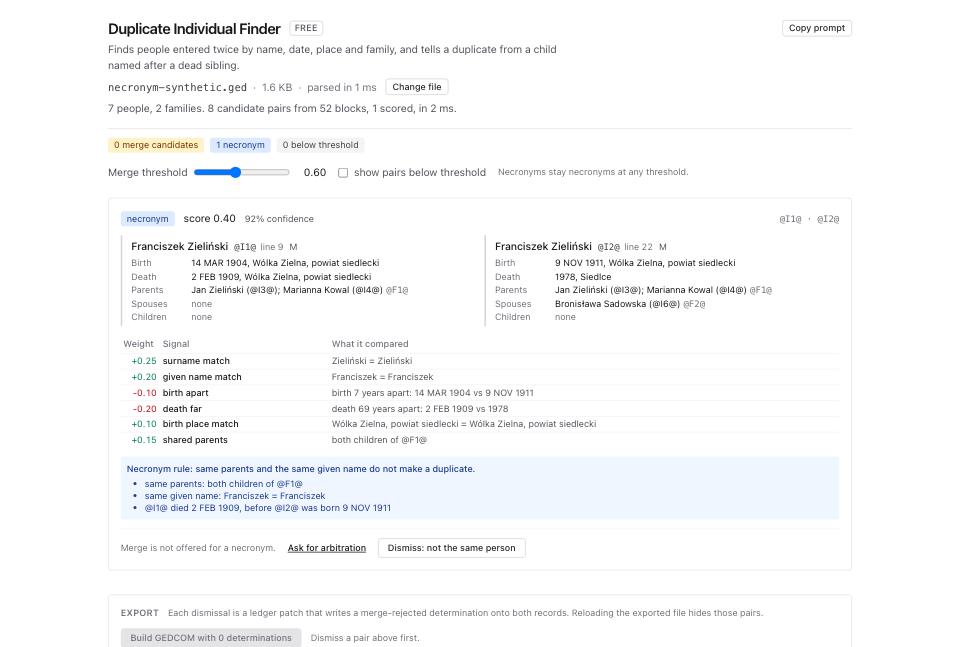
- Drag Merge threshold down to 0.45 to include lower-scoring candidates, or up to 0.75 to narrow them. Tick show pairs below threshold to include returned pairs below your threshold. The default floor is 0.30, with exceptions for necronyms and reciprocity findings. The page shows up to 200 pairs, the analysis returns up to 2,000, and candidate generation can skip oversized name groups. The slider does not re-run the search.
- When you are sure a pair is one person, click Merge in the workbench. That opens Merge Workbench with both xrefs in the URL, so the link is reproducible.
- In the workbench, check the two pickers, A (survivor) and B (absorbed). A keeps its xref, B is removed. Put the record with the better sourcing in A.
- Walk the comparison table. Each row is one field with four columns: A, B, Choice, Result. The Choice column has three buttons: A, B, both. The default is stated with a confidence and the signals behind it. A row marked
conflictmeans the same singleton tag holds different content, and the default for names and events isboth, so the file shows the disagreement rather than hiding a date. - Read Pointers to B elsewhere at the bottom. It lists pointers to rewrite to A and duplicate relationship pointers to drop, with line numbers.
- Click the merge button. It names both records, so merging
@2@into@1@reads Merge @2@ into @1@. The whole merge is one ledger patch, and its inverse is written into the file as amerge-donedetermination. - Click Download merged .ged, then load that download before starting another tool. Page changes do not save edits into the original file. Keep the inverse notes intact and preserve the pre-merge backup; later edits, privacy redaction or other importers can prevent unmerge.
- When you are not sure, go back to the finder and click Ask for arbitration on the pair instead. See the next section.
- When a pair is two different people, click Dismiss: not the same person. That writes a
merge-rejecteddetermination onto both records. - Click Build GEDCOM with N determinations and download. Load that file next time and the finder hides every pair you dismissed.
When you are not sure
Merge Conflict Arbitration argues one pair both ways. It shows both records in full, the duplicate finder's signal breakdown, the reciprocity flag, the necronym verdict when it fires, and any determination the file already carries for the pair.
Two buttons produce a recommendation. Rule-based answer only replays the signals and necronym rule in your browser without sending file data. Ask the model sends every line of both selected records, linked parents', spouses' and children's names, xrefs and birth/death dates, the score and signals, the necronym flag, and existing determinations for the pair. Read the payload-size disclosure before clicking. Records can include private notes and citations. The request goes through /api/ai/v1 to OpenRouter and the selected model provider.
Model access can open a separate /ai-access challenge window. Closing it or encountering a model error returns a rule-based fallback. Check whether the answer says model or rule-based, no model; a fallback is not an AI assessment. Do not send living people's details without authority to share them.
The answer is merge, do-not-merge or insufficient-evidence, with the reasoning, a confidence, and a list of what would settle it. Nothing is applied. The two exits are Open in merge workbench and Dismiss as different people.
What to check when it worked
- The
INDIcount in File Inspector drops by exactly one per merge. - Open the downloaded survivor in GEDCOM Viewer. Confirm the citations, notes and events you chose to retain.
- Open the family the absorbed record belonged to. It lists the survivor once, not twice.
- Open Determination Ledger on the merged file. Every merge appears as a
merge donerow naming both xrefs, and every dismissal as amerge rejectedrow. - Run Link Reciprocity Checker on the merged file. A merge that fixed a one-way link makes that finding go away.
- Run GEDCOM Validator on the download and investigate new errors, including conflicting singleton fields you chose to keep.
What to do when it did not
The finder shows no pairs and you know there are duplicates. Lower the threshold to 0.30 and tick show pairs below threshold. Missing blocking keys, a low score or result limits can hide a pair. You can select the known xrefs in Merge Workbench or Arbitration for direct review. Add dates or family links only when a source supports them, not to force a match.
A pair you dismissed keeps coming back. The dismissal only persists in the exported file. Click Build GEDCOM with N determinations, download, and use that file from then on.
You merged the wrong pair. The workbench writes an inverse into the exported file. Recovery needs readable inverse data and compatible current records. See how to undo a merge you should not have made.
A necronym pair is what you want to merge. The finder omits its merge link at any threshold. Read how to tell a duplicate from a child named after a dead sibling first. Check missing births, death dates, family links and any recorded necronym determination. Correct only source-supported errors. Direct selection in the workbench can still offer a merge, so the finder warning does not replace your review.
The two records disagree about a date and you do not know which is right. Take both in the workbench. The survivor keeps two BIRT events, the file records the disagreement, and GEDCOM Validator lists it so you can settle it with a source later.